





Vitaly
Administrators
-
Joined
-
Last visited
Everything posted by Vitaly
-
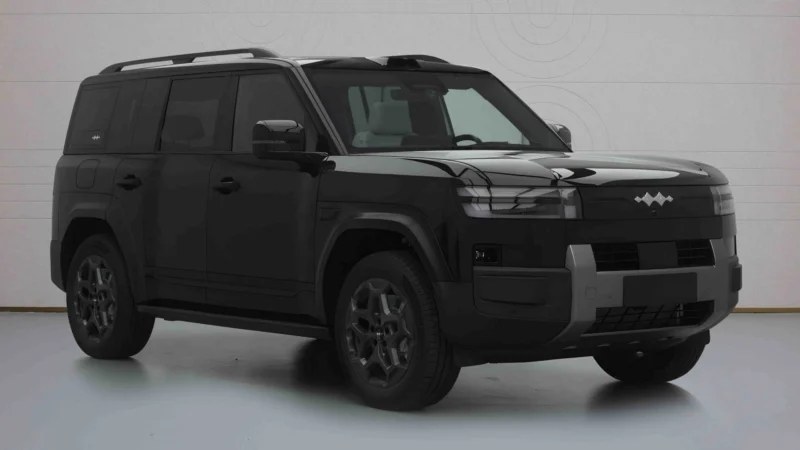 The updated BYD Ti7 plug-in hybrid crossover will adopt a large 50 kWh LFP battery in China, suitable for 230 km of electric range under WLTC conditions. The ongoing variant of this SUV, marketed as Fang Cheng Bao Ti7 in China, has been released in foreign markets this year. The currently available plug-in hybrid modification of the BYD Ti7 for the Chinese market offers two battery options. The entry-level car adopts a 26.6 kWh battery for 105 km of WLTC electric range. As for the more expensive trim level, it offers a 35.6 kWh pack for 140 km of WLTC range. Recently, the Chinese Ministry of Industry and Information Technology (MIIT) exposed the long-range version of the Ti7 during the domestic homologation process. The updated BYD Ti7 adopts a 50 kWh LFP battery manufactured by BYD subsidiary FinDreams. This pack boasts a weight of 384 kg. It is 164 kg heavier than the battery of the entry-level Ti7 PHEV. The long-range Ti7 has a curb weight of 2,350 – 2,530 kg, depending on the drive type. The entry-level model with a 1.5-liter ICE for 115 kW (154 hp) and a single electric motor for 200 kW (268 hp) can run up to 230 km in electric mode (WLTC conditions). Its fuel consumption with a depleted battery is 5.98 liters per 100 km. The BYD Ti7 with a 50 kWh battery The AWD variant of the long-range BYD Ti7 has an EV range of 210 km and a fuel consumption of 6.3 liters per 100 km. This model has the same 1.5-liter ICE paired with two electric motors with a combined peak power output of 360 kW (483 hp). There is a chance the long-range variant of the BYD Ti7 PHEV will adopt the flash charging technology, allowing it to charge the battery from 10% to 97% in nine minutes. The BYD Ti7 PHEV for the domestic market is a five-seat SUV with a five-seat interior. Its dimensions are 4999/1995/1865 mm with a wheelbase of 2,920 mm. It can tow up to 2,000 kg. This model is also available with a BEV powertrain option. It has two battery variants for 92 kWh and 105.7 kWh, boasting 675 – 755 km of CLTC range. The Ti7 is priced between 179,800 and 239,800 yuan (26,530 – 35,385 USD). According to China EV DataTracker, the BYD Ti7 sold 94,417 units in China, becoming one of the most popular models domestically despite widespread issues with its panoramic glass roof. The BYD Ti7 monthly sales volume in China. Credit: China EV DataTracker
 -
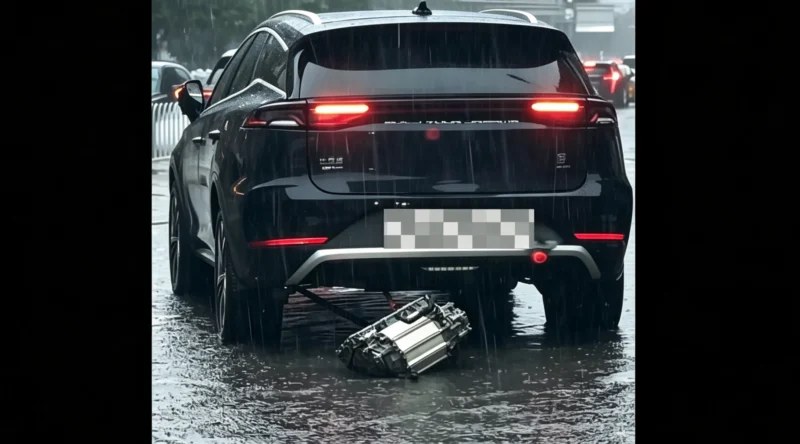 BYD passenger vehicles navigating deep urban water accumulation became the centre of a social media debate on July 13, 2026, after video footage from Shenyang, China, showed an underbody component separating from a BYD Tang. The clip triggered online rumours claiming that the electric powertrain motor had uncoupled and dropped directly into the floodwater. Netizens quickly weaponised the incident, using satirical nicknames to mock the automaker even as the vehicle continued to drive forward after the component fell. The detached part involves the lower protective skid plate rather than the physical electric motor assembly. Ripping off large plastic or composite shields is a known mechanical byproduct of the high hydrodynamic pressure that occurs when vehicles force their way through deep water. Because the vehicle maintained operational power and functioning rear lamps, the internal electrical systems remained entirely intact. Engineering reality From an automotive engineering perspective, separating an electric motor while driving is impossible without causing an instantaneous electrical shutdown. High-voltage orange power lines and cooling conduits connect the powertrain directly to the chassis, so a structural drop would instantly tear them apart. This would immediately activate insulation-fault safety mechanisms, resulting in a power cut. Furthermore, the powertrain transfers energy to the wheels through metallic half-shafts. Had the motor housing fallen, these spinning shafts would have warped or been completely severed, locking the wheels and stopping the vehicle. Instead, the video shows the vehicle gliding smoothly through the water, confirming that the propulsion unit remained securely in place in the engine bay. Executive warnings The social media response highlights a growing public misunderstanding regarding the limits of electric vehicle waterproofing. This event occurred five days after BYD Executive Vice President He Zhiqi published a safety brief on July 8, 2026, clarifying the boundary between hardware resilience and risky driving habits. He noted that while the signature Blade battery pack features IP67 and IP68 water resistance, allowing immersion at a depth of 1 meter for 24 hours without leakage, these specifications are engineering safety limits rather than operational guidelines. Drivers frequently overestimate these ratings, treating family vehicles like amphibious craft, as seen in previous severe weather events across China. This mindset reflects a pattern in which car owners attempt risky crossings, as seen in the widely discussed instances of the BYD Yangwang U8 navigating deep flood waters during Super Typhoon Ragasa. Official advice states that if water levels cover more than half of the tyre, drivers must bypass the area. Market trajectory The incident occurs during a shifting demand cycle for the company. In June 2026, BYD domestic sales reached 177,442 units, up 7.6% month on month, even as year-on-year sales contracted by 44.4%, according to China EV DataTracker. The brand maintained an 11.0% domestic market share for the month, demonstrating steady momentum despite shifting industry conditions. To assist in severe weather crises, specialised BYD emergency support convoys entered flood zones to provide disaster relief earlier this month. As electric vehicles capture substantial portions of the local automotive ecosystem, public scrutiny of underbody durability under weather conditions will likely intensify. High hydrodynamic pressure from wading through deep water can easily tear off exterior protective underbody panels.
 -
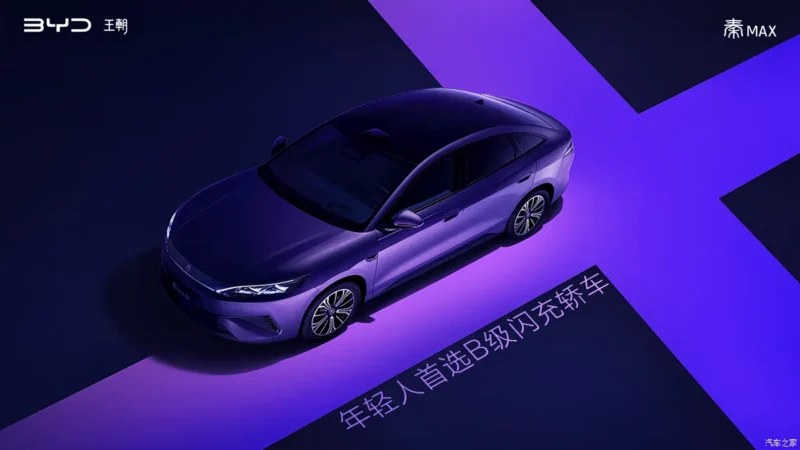 BYD has officially announced the upcoming launch of the “Qin Max,” a new B-class sedan positioned above the current Qin L model. Lu Tian, General Manager of BYD’s Dynasty Network Sales Division, said the vehicle is designed for younger consumers with a focus on high-speed charging capabilities. This model was first exposed by the regulatory filings last December. Dimensions and design The Qin Max measures 4866 mm in length, 1880 mm in width, and 1495 mm in height, with a wheelbase of 2820 mm. Compared to the Qin L (4830 mm x 1900 mm x 1495 mm, 2790 mm wheelbase), the new model is 33mm longer. The exterior adopts BYD’s family design language, featuring sharp, upward-sweeping headlights and a closed-off front grille. The front fascia is complemented by a three-section air intake. The side profile utilises semi-hidden door handles and multi-spoke wheels, while the rear features intricate ribbon-like light textures. Side and rear of the Qin Max. Powertrain and performance The Qin Max will be available in both plug-in hybrid (PHEV) and battery electric vehicle (BEV) configurations: Plug-in hybrid: Features a 1.5L naturally aspirated engine paired with an electric motor. The engine delivers a maximum power of 74 kW, while the motor provides 175 kW (235 hp). It is equipped with a lithium iron phosphate (LFP) battery pack. Battery electric: Offers two motor options with maximum power outputs of 120 kW (161 hp) and 240 kW (322 hp). Battery capacities are 52.868 kWh and 64.315 kWh, providing CLTC-rated ranges of 530 km and 630 km, respectively. Flash Charging A standout feature of the Qin Max is its integration of BYD’s second-generation Blade Battery and flash-charging technology. According to test data from existing BYD models with similar technology, the vehicle can charge from 10% to 70% in 5 minutes, and from 10% to 97% in 9 minutes. In extreme cold weather conditions of -30°C, the charging time only increases by 3 minutes.
 -
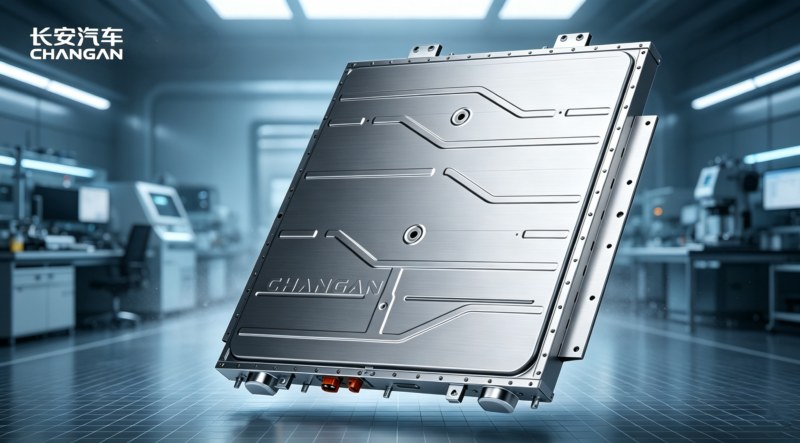 Power battery architectures and ultra-fast charging systems received the highest state-level recognition at the State Science and Technology Progress Awards. The engineering accolades highlighted major breakthroughs in structural welding, intelligent electric chassis design, and high-velocity thermal management systems. The official listings clarify that these honours represent massive cross-industry development efforts rather than single-manufacturer monopolies. Thermal control systems capable of managing intensive electrical currents formed the centrepiece of the state safety commendations. The foundational research for the high-safety, long-life power battery systems project was jointly completed by a consortium including Changan Automobile, China Automotive Engineering Research Institute, Calb, and BYD. This collaborative framework established the standardised protocols that allow modern cells to withstand high-amperage grid deployment while remaining structurally shielded from corrosive acid formations. Battery control systems Managing thermodynamic energy during intensive grid replenishment cycles requires maintaining internal cell temperatures below the strict 65°C regulatory mandate. The award-winning test and control technologies enable vehicle software to monitor localised telemetry multiple times per second, preventing hot spots from expanding. This precise hardware integration enables vehicles to approach the safety threshold without causing premature cell degradation or lithium plating. The framework isolates the underlying mathematical software telemetry from the proprietary physical hardware deployed by individual automakers. Rather than establishing a shared cell layout, the project standardises the algorithmic predictive models and thermal management rules that determine how vehicle software monitors real-time state-of-charge data at any given millisecond. This unified system allows cooling hardware to act dynamically before cells breach the critical safety threshold, while preserving the proprietary structural identity of each manufacturer’s cell lines. Consequently, physical cell form-factors and chemical properties remain highly distinct across participating manufacturers. For instance, BYD relies on long, rectangular Lithium Iron Phosphate cells integrated as load-bearing structural beams, whereas Changan optimises high-stability cell designs focusing on an extended 5,000-cycle durability limit. By isolating software control protocols from the hardware layer, the joint state honour provides a shared safety blueprint while preserving private market variance in physical packaging and battery energy densities. Changan Automobile officially noted that this award validates its proprietary Golden Shield battery technology, utilised in Deepal brand passenger models. Concurrently, the underlying multi-brand research supports rival high-power systems, including high-acceptance platforms that validate Geely short-blade cell architectures, which achieved a certified peak input of 1,093 kW during state validation testing. The cooperative engineering push has successfully transitioned to retail vehicles, enabling the deployment of approximately 100,000 flash-charging vehicles now operating on domestic roads. Redundant chassis engineering Intelligent electric chassis systems also secured separate high-level engineering honours for architectural fault tolerance and structural integration. This specific engineering project was co-developed by Tsinghua University alongside passenger vehicle manufacturers including BYD, Geely, and Great Wall Motors. The engineering focus is on creating a fail-operational design by utilising electromechanical braking with the highest functional safety ratings to guarantee vehicle control if primary digital lines experience interference. Automakers are leveraging these intelligent chassis configurations to heavily optimise energy efficiency through advanced regenerative braking algorithms. The systems capture kinetic energy during deceleration and return it directly to the battery pack, extending real-world city driving range by up to 15%. This structural development operates in tandem with automated driver assistance systems to handle high-speed cornering and lateral stability control on upcoming premium vehicle platforms. Advanced manufacturing standards Precision manufacturing lines received dedicated accolades for accelerating the deployment of lightweight, thin-walled structural vehicle components. The engineering project introduced real-time closed-loop monitoring systems for resistance welding lines to eliminate structural warping during assembly. The automated systems dynamically alter electric currents instantly to ensure uniform bond strength across high-strength steel and aluminium panels, significantly reducing factory defects across multiple assembly plants. The standardisation of these vehicle-side technologies directly supports the rapid scaling of the domestic high-voltage charging grid infrastructure. Automakers are currently expanding competitive high-power networks, deploying terminal stations capable of delivering up to 1,500 kW of peak output. These infrastructure deployments leverage the latest high-power hardware configurations optimised to dramatically reduce charging times, successfully scaling grid acceptance speeds while maintaining long-term battery durability across competing manufacturer lineups. Sources: Sina, EastMoney
 -
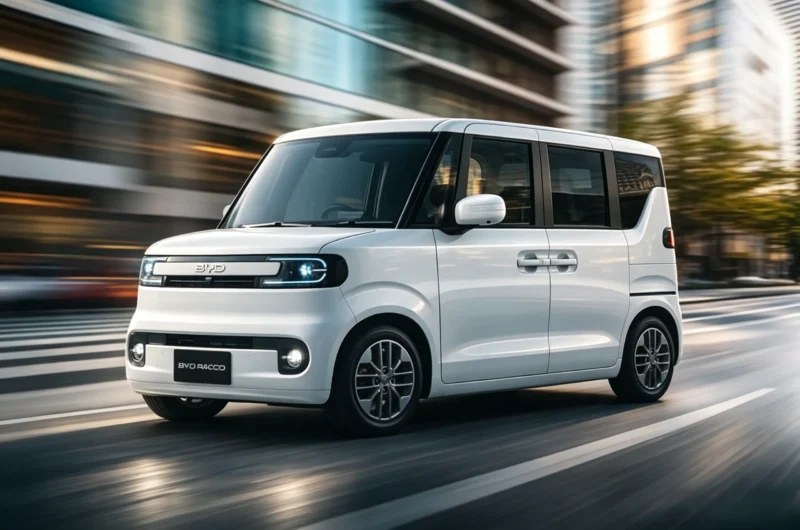 BYD passenger vehicle platforms will officially introduce the right-hand-drive Racco electric microcar to the Japanese consumer marketplace on July 28, 2026, according to EV-Times. This newly developed model marks a competitive entry into the protected domestic K-car segment to capture urban market share. Broadcast media campaigns featuring actress Alice Hirose have commenced across regional channels under the “Racco Raku” slogan to accelerate consumer engagement prior to release. The microcar utilises a custom-engineered footprint measuring 3,395 mm in length, 1,475 mm in width, and 1,800 mm in height, with a wheelbase of 2,520 mm. This specialised architecture optimises interior space for suburban commuters while building upon the previous deployment of the Sealion 6 crossover platform. Trims and performance The series offers two distinct cell performance configurations to serve specific urban driving profiles. The 200 variant combines a 22.4 kWh battery with an official 210 km operational range under local WLTC testing cycles. Upgrading to the 300 tier provides a larger 35.84 kWh configuration, extending driving range to 320 km. This performance represents an increase in capacity over the initial regulatory baseline range validated during the prototype phases. The entry version carries an adjusted base price of 120,000 yuan (17,700 USD) following regulatory interventions. Electrical replenishment relies on a fast-charging infrastructure peaking at 50 kW across public networks. BYD’s brand-new electric microvan brings a class-leading 320 km range and sliding doors to challenge Japan’s domestic incumbents. Market pricing dynamics While the 50 kW charging rate matches the Honda N-One e’s, it exceeds the Nissan Sakura’s 30 kW charging capacity. However, defensive positioning by local manufacturers created friction in the marketplace, altering initial retail pricing structures. Although internal manufacturing efficiencies permitted an initial profitable target of 60,000 yuan (8,820 USD), the vehicle launches at the adjusted baseline. Local incumbents like Suzuki historically identified the incoming platform as a major competitive threat to their segment dominance. To navigate these barriers, the group appointed a former Nissan specialist to guide regional corporate strategy. The premium tiers justify this adjusted cost structure by introducing segment-first electric sliding doors with a hands-free foot projection layout. Utility and scaling The modular rear seating row folds completely flat, unlocking up to 1,372 litres of cargo space for commercial final-mile configurations. The cabin also features digital NFC keys, automated battery preheating for winter driving, and heated cup holder layouts. This international expansion project is fully financed by sustained production volume within the automaker’s home assembly network. June 2026 records confirm the Yuan UP led domestic compact output with 17,945 units, scoring a 5.3% sequential expansion. The Song Pro DM-i added 17,439 deliveries, while the Sealion 06 and Qin Plus EV secured 16,843 and 13,726 sales, respectively. According to China EV DataTracker. Japanese star Alice Hirose headlines the new BYD Racco television commercial.
 -
Try using a USB flash drive https://www.youtube.com/shorts/9O0lrrdD3dk
-
BYDMate BYDMate is an Android app for the BYD DiLink 5.0 head unit (Leopard 3 / Fangchengbao Tai 3). It logs trips, GPS routes, real energy consumption from the BMS, charging sessions, and provides AI-driven driving analytics. No Google Play Services required. The stock onboard computer underestimates consumption by 10-30%. BYDMate reads data directly from the BMS (energydata SQLite) and shows the real figure. Plus data the stock system does not surface: idle drain, cell balance, trip cost, AI insights. Core features (trips, charges, automations, local insights, offline voice agent) run entirely on-device and require no internet. Cloud features are off by default and enabled only by entering a key. What leaves the device and when is described in Data & Network. How to install - https://github.com/AndyShaman/BYDMate/blob/main/README.en.md#install Github: https://github.com/AndyShaman/BYDMate/ Version Link v3.5.2 GitHub
-
-
Firmware update 34.1.37.2604173Firmware version34.1.37.2604173FSE versionFSE 42.1.4.2512222ModelsBYD Leopard 8Update contentUnknownChipset34 chipsetRegionChineseDetails34.1.37.2604173 (None drone) 🇷🇺 Китайская прошивка на 34 чипсет. 🇺🇸 Chinese firmware for 34 chipset. 🇺🇿 34-chipset uchun xitoy proshivka LinksMedia ADAS FSE
-
Firmware update 23.1.61.2602236.1_0Firmware version23.1.61.2602236.1_0ModelsBYD HanUpdate contentДанное обновление в первую очередь добавляет новые функции и улучшения, включая систему видеорегистратора с пятью камерами и новую функцию загрузки тревожных видеозаписей в режиме Sentry. Основные изменения: 1. Поддержка видеорегистратора с пятью ракурсами 2. В режиме Sentry добавлена функция загрузки тревожных видеозаписей 3. Автоматическое включение 360°-обзора при поворотах на скорости ниже 15 км/ч 4. В пользовательские настройки кнопок добавлена функция Parking Assist 5. Оптимизировано пробуждение системы при парковке This update mainly introduces several new features and improvements, including a five-view dashcam system and a new risk video upload function for Sentry Mode. Key features: 1. Five-view dashcam support 2. Sentry Mode now supports uploading risk event videos 3. Automatic activation of the 360° camera view when turning at speeds below 15 km/h 4. Added Parking Assist to customizable button settings 5. Improved parking wake-up sensitivity managementChipset23 chipsetRegionChineseDetails🇷🇺 Китайская прошивка на 23 чипсет. 🇺🇸 Chinese firmware for 23 chipset. 🇺🇿 23-chipset uchun xitoy proshivka Links012f5b68
-
Firmware update 23.1.83.2602236.1_0Firmware version23.1.83.2602236.1_0ModelsBYD Song PlusUpdate contentДанное обновление в первую очередь добавляет новые функции и улучшения, включая систему видеорегистратора с пятью камерами и новую функцию загрузки тревожных видеозаписей в режиме Sentry. Основные изменения: 1. Поддержка видеорегистратора с пятью ракурсами 2. В режиме Sentry добавлена функция загрузки тревожных видеозаписей 3. Автоматическое включение 360°-обзора при поворотах на скорости ниже 15 км/ч 4. В пользовательские настройки кнопок добавлена функция Parking Assist 5. Оптимизировано пробуждение системы при парковке This update mainly introduces several new features and improvements, including a five-view dashcam system and a new risk video upload function for Sentry Mode. Key features: 1. Five-view dashcam support 2. Sentry Mode now supports uploading risk event videos 3. Automatic activation of the 360° camera view when turning at speeds below 15 km/h 4. Added Parking Assist to customizable button settings 5. Improved parking wake-up sensitivity managementChipset23 chipsetRegionChineseDetails🇷🇺 Китайская прошивка на 23 чипсет. 🇺🇸 Chinese firmware for 23 chipset. 🇺🇿 23-chipset uchun xitoy proshivka LinksLink
-
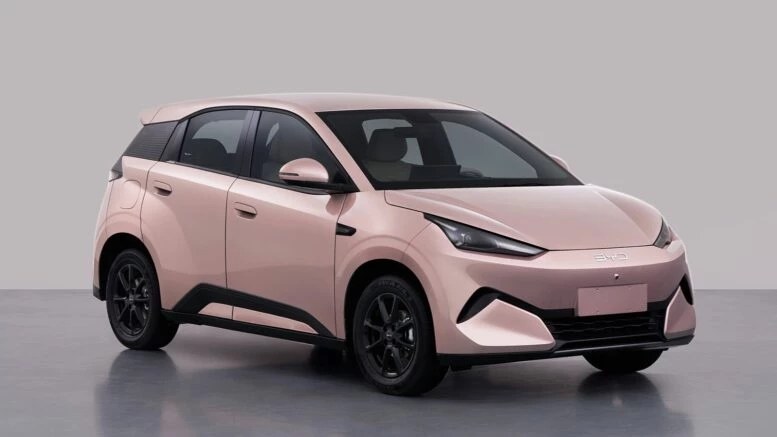 BYD готовит к выходу новое поколение электрического хетчбэка Seagull. Первые подробности появились в свежей выкладке минпрома КНР. Напомним, эта модель пользуется большой популярностью в Китае и была признана лучшим ситикаром мира по версии премии World Car of the Year. Что это за автомобиль?Сразу стоит обратить внимание на экстерьер второго поколения Seagull. Он стал куда более агрессивным и спортивным. Новая передняя оптика и агрессивный передний бампер. BYD готовит к Новое поколение Электрического хетчбэка BYD Seagull / фото из базы минпрома КНР Сбоку тоже можно заметить несколько важных изменений. Во-первых, даже визуально заметно, что кузов стал длиннее за счет задней стойки. Во-вторых, на крыльях и дверях появились заметные «выпуклые» выштамповки. В-третьих, ручки дверей полускрытые, это требования китайского законодательства. В-четвертых, лючок зарядного разъема переехал с переднего правого крыла на заднее правое. Сзади новый BYD Seagull лишился монофонаря и получил оригинальную узкую оптику с намеком на спорт. Бампер, на манер первого поколения, остался довольно массивным и со вставками в цвет кузова. Камера заднего вида, кстати, расположена над номерным знаком, что очень плохо, так как она будет постоянно загрязняться. Элементы экстерьера нового BYD Seagull / фото из базы минпрома КНР Габариты: 4205 мм в длину, 1810 мм в ширину и 1570 мм в высоту. Колесная база – 2650 мм. То есть модель на 425 мм длиннее китайской версии Seagull первого поколения, на 95 мм шире, на 30 мм выше, а колесная база на 150 мм больше. При этом по своим размерам новый Seagull напрямую приблизился к более крупному Dolphin. Тот имеет следующие параметры: 4280 х 1770 х 1570 мм. Колесная база – 2700 мм. Изображений внутреннего пространства нет. Нет и информации об оснащении будущей новинки, но оно явно будет достойным. Техническая частьЭлементы экстерьера нового BYD Seagull / фото из базы минпрома КНР BYD Seagull второго поколения будет строго электромобилем. В движение модель приводит один-единственный электромотор TZ164XYB от Zhengzhou BYD Automobile Co., Ltd. мощностью 129 л.с., что ощутимо мощнее, чем у предыдущей генерации (75 л.с.), но все еще уступает топовым версиям Dolphin. Снаряженная масса составляет 1180 и 1255 кг соответственно. Максимальная скорость в любом случае ограничена на отметке в 150 км/ч. Емкость батареи и запас хода остаются неизвестными. Что дальше?Электрический хэтчбек BYD Seagull первого поколения Фактически будущий Seagull может заменить не только модель первого поколения, но и актуальный Dolphin китайской спецификации. Тем более что последний со сменой поколений также может уйти в более высокий класс. В любом случае BYD Seagull второго поколения явно будет играть в другой весовой категории, где у него довольно мало противников, ведь большинство китайских электрохетчбэков имеет куда меньшие габариты. Андрей ТРУБИН (@chinamashina)
 -
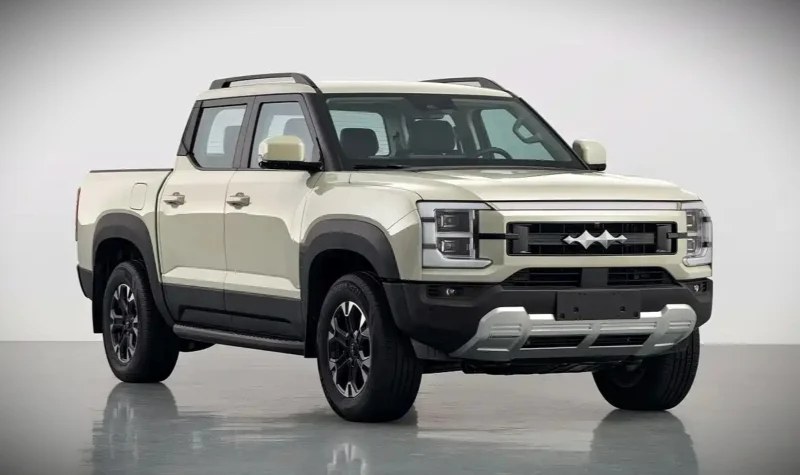 BYD Shark 6 plug-in hybrid pickup trucks have completed regulatory registration for the domestic market under Fang Cheng Bao Shark. The upcoming vehicle emerged in the latest public catalogue from the Ministry of Industry and Information Technology. This certification marks the official transition of the model into the domestic retail pipeline following its initial international introduction. The dual-row vehicle utilises the specialised DMO platform architecture shared with the brand’s off-road SUV portfolio. Physical measurements indicate an overall length of 5,457 mm, a width of 1,971 mm, and a height of 1,925 mm, all resting on a 3,260 mm wheelbase. The integrated cargo bed measures 1,520 mm in length, 1,530 mm in width, and 515 mm in side panel depth. Powertrain and battery The localised vehicle features a 1.5T turbocharged gasoline engine paired with a dual permanent magnet synchronous motor configuration. The internal combustion powerplant provides a gross output of 143 kW alongside a certified net power rating of 135 kW. This hybrid powertrain supports an enhanced top speed of 180 km/h, representing a clear hardware calibration delta over the 160 km/h maximum speed of the 2025 overseas version. Electrical traction relies on independent front- and rear-drive units to optimise off-road capabilities. The front axle motor delivers a peak power of 170 kW with a steady rated output of 80 kW. On the rear axle, the secondary electric drive unit generates a peak power of 150 kW and maintains a rated output threshold of 70 kW. When contrasted with international-marketplace variations, the domestic vehicle highlights a highly strategic powertrain alignment. While the standard global 1.5T configuration outputs a combined system peak of 321 kW (430 hp) and the top-tier international variant scales to 350 kW (469 hp), the certified Chinese version balances its 143 kW internal combustion setup with a combined electric motor peak power of 320 kW. This electrical layout cleanly pairs the 170 kW front drive unit with the 150 kW rear drive unit, mirroring the global motor hardware footprint while optimising localised electronic calibrations to unlock the higher 180 km/h top speed limit. Hardware and options Structural metrics indicate a vehicle curb weight of 2,710 kg and a maximum gross vehicle weight rating of 3495 kg. The pickup truck has a certified payload rating of 460 kg and an authorised maximum towing capacity of 2,500 kg for trailering equipment. Approach and departure clearance angles are certified at 31 degrees and 22 degrees, respectively, though adding a specialised tow hook adjusts the rear departure clearance to 20 degrees. The regulatory data shows that the electrical energy storage system utilises a lithium iron phosphate chemistry supplied by FinDreams Battery. Mechanical safety is managed by Bosch’s anti-lock braking system. Buyers can select exterior modifications, including customizable front decorations and an optional rear cursive script nameplate. Strategy and market The domestic market push comes at a critical time as the BYD Shark 6 export volume declined 25% YoY in H1 2026. This introduction represents a corporate realignment to leverage growing interest in alternative-energy pickup vehicles in mainland China. Industry analysts note that advanced Chinese plug-in trucks represent distinct product paradigms, consistent with Ford CEO Farley’s previous observations on the highly competitive structural parameters of Chinese pickups. Brand domestic retail data from June 2026 shows that Fangchengbao delivered 27,907 vehicles, representing a 5.9% month-on-month increase and a 47.6% year-on-year expansion, according to China EV DataTracker. This volume secured a 1.7% domestic market share for the brand during the monthly tracking window. BYD prepares its domestic market rollout by rebranding the Shark pickup truck under the Fang Cheng Bao marque.
 -
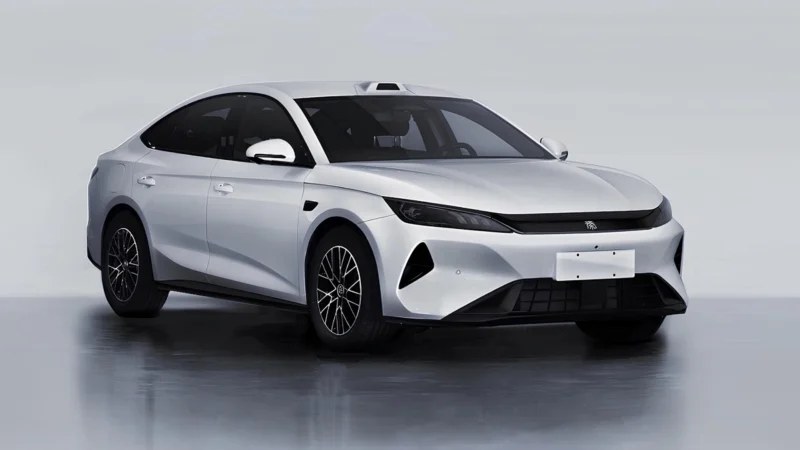 The new BYD Qin Plus was exposed in China with a new exterior design and a LiDAR sensor as the car prepared for the commercial rollout. This model will be able to cruise from address to address on its own, with the driver just keeping an eye on the situation. The current Qin Plus DM-i is priced below 100,000 yuan (14,755 USD). The new BYD Qin Plus was exposed by the Chinese Ministry of Industry and Information Technology (MIIT) during the domestic homologation process. The car applied for a sales license, getting ready for the market launch. According to MIIT, the new vehicle could be assembled at six BYD’s factories at the same time. It isn’t surprising, as the ongoing Qin Plus was among BYD’s bestsellers for a long time. According to China EV DataTracker, it hit an all-time high in 2024, delivering 480,025 units domestically. The new BYD Qin Plus became a twin model of the larger BYD Qin L sedan. It seems that the Qin L and the Qin Plus could be potentially unified into one model. The new Qin Plus adopts the distinguishing Loong Face (Dragon Face) design language with a closed front end. It adopts a large air intake, sharp headlights, and a chrome-plated element between those elements. The car has real door handles and a single taillight unit. Dimensions of the new Qin Plus are 4840/1900/1498 mm with a wheelbase of 2,800 mm. For clarity, it is 60 mm longer, 63 mm wider, and 17 mm higher than the ongoing model. Moreover, its wheelbase was stretched by 82 mm. The new car rides on 16- or 17-inch wheels. Its front and rear overhangs are 978 mm and 1,062 mm, respectively. Approach and departure angles are 13 and 14 degrees. The curb weight is 1,610 kg, while the gross weight reaches 2,005 kg. The new BYD Qin Plus is a twin model of the Qin L The new BYD Qin Plus adopts a plug-in hybrid DM-i powertrain with a 1.5-liter naturally aspirated BYD472QC engine under the hood, producing 74 kW (99 hp). It is paired with a 120 kW (161 hp) electric motor. The car can speed up to 180 km/h. Two LFP battery options are available, offering the capacity variants of 16.2 and 24.3 kWh. The car’s electric range is 107 – 160 km. The fuel consumption with a drained battery is 3.6 – 3.7 liters per 100 km. The new BYD Qin Plus adopts a LiDAR sensor on the roof, signaling that this car adopts the DiPilot 300 (“God’s Eye B”) assisted driving system. It is capable of performing the Navigate on Autopilot function on urban roads and highways. With this function active, a car can drive from address to address automatically. However, the driver still needs to monitor the situation, being ready to take over at any time. The ongoing Qin Plus costs 79,800 – 99,800 yuan (11,775 – 14,725) in China. It seems that the new model will be priced higher due to increased dimensions and a LiDAR sensor.
 -
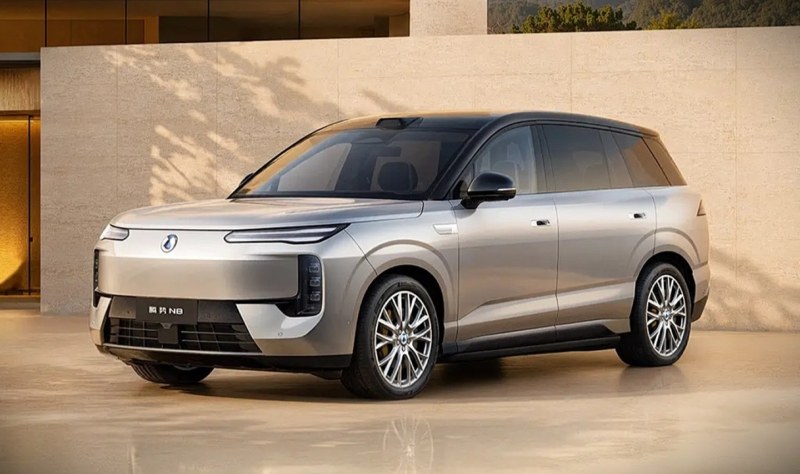 BYD’s premium electric vehicle brand, Denza, has revealed its upcoming lineup of pure-electric large SUVs via official regulatory filings. The newly registered variants include the five-seat Denza N8 and the longer six-seat Denza N8L. Both premium models leverage advanced battery hardware architectures to expand the manufacturer’s footprint in the competitive family segment. The technical layout outlines a physical blueprint sharing a 3,075 mm wheelbase across both body options. While the six-seat model spans 5,200 mm, the five-seat variant measures 5,150 mm, indicating a body reduction of exactly 50 mm. Width and height remain identical across the portfolio at 1,999 mm and 1,820 mm, respectively. Powertrain and battery The electrical propulsion architecture introduces a high-performance tri-motor configuration alongside two high-output single-motor layouts. The high-specification tri-motor variant integrates a 270 kW front motor with twin 310 kW rear motors, delivering a combined system output of 890 kW (1,193 hp). Meanwhile, the single-motor configurations offer peak selections of 320 kW or 370 kW. Energy storage relies exclusively on the second-generation Blade Battery developed by FinDreams. This advanced cell system incorporates specialised flash charging capabilities designed to handle rapid energy transfer even in challenging operational environments. Official technical claims indicate that the new battery architecture reduces charging times while minimising range degradation in a minus-30-degree climate. Denza equips the new N8 electric vehicle with its God Eye 5.0 smart driving assist platform. Smart driving integration The driver assist package features the proprietary God Eye 5.0 smart driving system to handle complex highway and urban navigation tasks. This hardware platform utilises an end-to-end large model trained on real-world driving datasets to execute automated path choices. Roof-mounted lidar sensors and front bumper millimetre-wave radars provide full environmental-scanning data to the computing brain. Visual customisation options allow buyers to select different wheel rim styles measuring 20 or 21 inches. Consumers can also select body-coloured roofs, unique brake callipers, and integrated electronic side steps, subject to regulatory listings. The rear of the vehicle features a distinctive dual-strip light bar that aligns with the design aesthetic of recent plug-in hybrid SUVs Market sales momentum The expanding pure electric lineup builds directly on previous EV range-boost disclosures targeting high-utilisation cell packs. Introducing these zero-emission options allows the premium brand to target a broader demographic of electric vehicle enthusiasts. The current plug-in hybrid versions retail from a baseline segment target of 299,800 yuan (44,071 USD) up to 349,800 yuan (51,421 USD). Denza delivered 18,631 vehicles during June 2026, marking a monthly climb of 19.3% and an annual expansion of 31.1%. This retail volume solidifies the brand’s 1.2% total market share in the domestic Chinese ecosystem, according to China EV DataTracker. The addition of these pure-electric options aims to maintain this delivery trajectory as commercial sales launch later this year.
 -
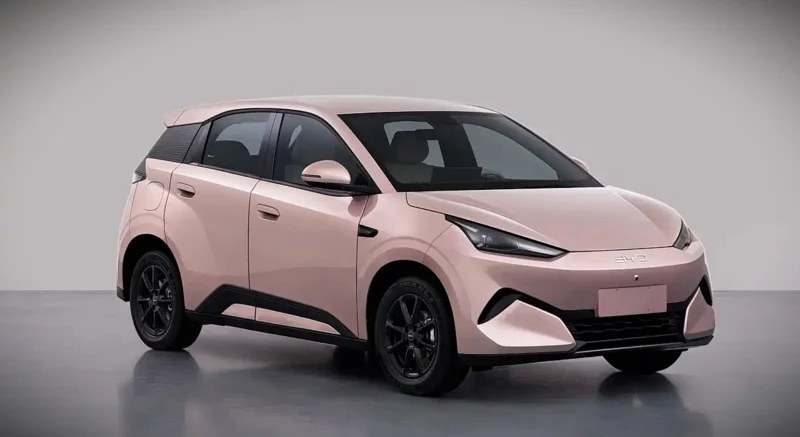 BYD Seagull electric hatchback configurations have officially surfaced in the latest regulatory declaration catalogue from the Chinese government. The Ministry of Industry and Information Technology published the certified vehicle specifications on July 10, 2026. This comprehensive generational update introduces major architectural changes to the popular urban electric platform. The updated vehicle architecture features an overhauled physical footprint with a length of 4,205 mm, a width of 1,810 mm, and a height of 1,570 mm. The wheelbase stretches to 2,650 mm, a 150 mm increase over the previous model-year database baseline. This larger structural design expands the body length by 425 mm and shifts the vehicle closer to the footprint of its larger sibling platform, the Dolphin. Powertrain and battery The updated hatchback configuration utilises a permanent magnet synchronous motor manufactured by Zhengzhou BYD Auto Co., Ltd. This electric drive unit, designated under model number TZ164XYB, delivers a peak power output of 95 kW (127 hp). This 95 kW output marks a mechanical expansion over the 55 kW (75 hp) motor utilised in the preceding model baseline, adjusting powertrain parameters to match the larger vehicle dimensions. Certified regulatory data confirms the propulsion system achieves a maximum top speed of 150 km/h. Energy storage relies entirely on lithium iron phosphate cells supplied by Shaoxing FinDreams Battery Co., Ltd. The component manufacturer also handles the final assembly of the complete functional battery pack. This hardware update builds directly on prior iterations, such as the 2026 BYD Seagull launch, which sustained the brand’s low-voltage product offensive. Mass and options The vehicle mass parameters reflect the increased physical dimensions of the chassis structure. The primary regulatory documentation notes a baseline curb weight variation of 1,180 kg, with a maximum total weight of 1,555 kg. Alternative high-specification lines record an expanded curb weight of 1,255 kg and a gross vehicle mass of 1630 kg. The manufacturer offers extensive exterior customisation options to support diverse consumer preferences. These accessories include distinct aerodynamic wheel designs, fender embellishments, side skirt trim strips, and various regional model badges. The five-seat cabin layout is supported by standard 205/60 R16 specification tyres across all catalogued variants. Market and nomenclature The passenger car operates under several regional naming schemes globally to manage international retail distribution. The automaker utilises the BYD Atto 1 and BYD Dolphin Surf designations depending on the specific destination market. Furthermore, the company deploys the BYD Dolphin Mini moniker alongside its core BYD Seagull identity under the overarching BYD corporate ecosystem. Smart driving capabilities receive a hardware expansion through an optional camera setup integrated into the high-mounted brake light assembly, following earlier observations of a lidar-equipped hatchback variant undergoing road testing. Competitive market vectors show Geely EX2 (Xingyuan) domestic sales reached 33,359 deliveries in June 2026, capturing a substantial brand share, according to China EV DataTracker. By comparison, the BYD Seagull recorded 9,825 retail sales during the same period, underscoring the strategic urgency of this dimensional expansion. New government listings reveal an optional assisted driving camera for the upcoming BYD Seagull hatchback.
 -
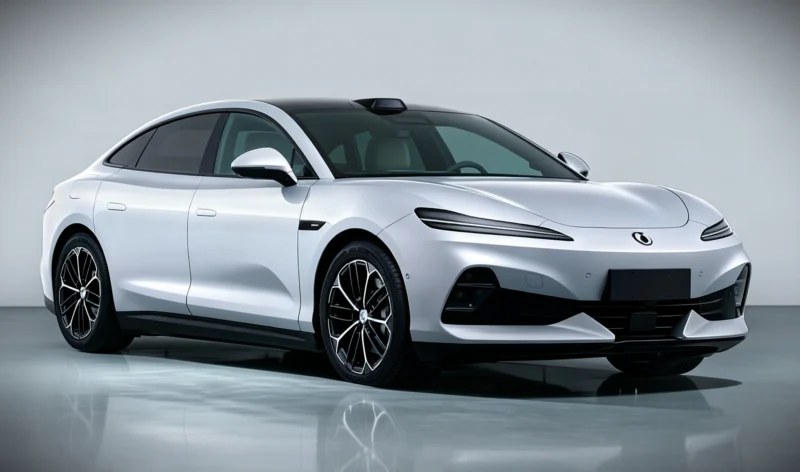 The Denza Z9S pure-electric sedan has been officially unveiled by the Ministry of Industry and Information Technology (MIIT) in its latest vehicle catalogue. Government regulatory filings revealed the upcoming luxury passenger car model ahead of its formal retail release, specifying two independent performance configurations sharing a large 3025 mm wheelbase. This sudden regulatory exposure provides a transparent view of the platform hardware driving the brand’s expansion. The new sedan architecture follows closely on the heels of high-profile premium product introductions from the premium joint venture, establishing a clear dual-layout strategy for the brand. This product expansion directly builds upon the fast retail trajectory of the Denza Z9 GT, which surpassed 10000 deliveries within 2.5 months of entering the consumer market. By adding a traditional notchback silhouette to the family, the automaker targets mainstream luxury demographics seeking understated premium proportions. Powertrain and hardware The baseline luxury trim utilises a permanent-magnet synchronous drive motor from Zhengzhou BYD, offering a rated capability of 160 kW and a peak output of 320 kW. This version has a curb weight of 2250 kg and utilises 19-inch wheel configurations with 245/50R19 front and 275/45R19 rear tyres. The underlying energy storage matrix utilises lithium-iron phosphate batteries, with cells manufactured by Hefei BYD and packs assembled by Shanwei FinDreams. The high-performance premium trim significantly increases output metrics by adopting an upgraded Zhengzhou BYD motor, generating a rated capability of 185 kW and a peak output of 370 kW (496 hp). This configuration weighs 2545 kg and employs 20-inch wheels paired with specialised HL275/40R20 tyres to handle the increased power draw parameters. Its lithium-iron phosphate battery hardware relies on cells produced by Wuwei FinDreams, with final assembly completed by Shenzhen BYD. Dimensions and equipment Certified physical parameters establish a broad stance for both sedan variants, with each vehicle measuring 5090 mm in length and 1980 mm in width. The lower-output model is slightly taller, with a body height of 1510 mm, whereas the higher-performance variant sits closer to the asphalt at 1490 mm. Both premium versions are limited to a top speed of 250 km/h and feature standard seating for 5 people. A fixed panoramic glass roof comes standard across the entire regulatory lineup alongside a mandatory automotive event data recorder (EDR) safety setup. Enthusiasts can customise the exterior appearance with optional factory equipment, including a motorised active rear spoiler, unique side-rearview mirror housings, and hidden door handle options. The high-performance variant features additional standalone options, including custom sport wheel rims and a variety of colored brake calliper finishes. Market delivery trends The arrival of the new sedan mirrors the premium automaker’s expanding domestic retail performance curve as it broadens its high-end vehicle portfolio. The premium brand recorded 18,631 sales in June 2026, marking a 19.3% month-over-month increase and a solid 31.1% gain compared with June 2025. These steady volume gains mark a clear departure from early-season registration drops, when winter volumes slipped to 5351 units, according to China EV DataTracker. This new luxury vehicle line slots into a product strategy aimed at solidifying premium market share, following the global path of the Denza Z, which debuted at Goodwood with a pre-sale starting from 184,800 USD. Utilising cost-effective lithium-iron phosphate battery packs across the Z9S lineup enables the automaker to set a highly competitive price bracket. This tactical architecture placement helps secure high-volume retail acquisitions while preserving the top-tier performance prestige of its global 1582 hp flagships. The upcoming executive sedan uses lithium-iron phosphate battery packs from specialised BYD subsidiaries.
 -
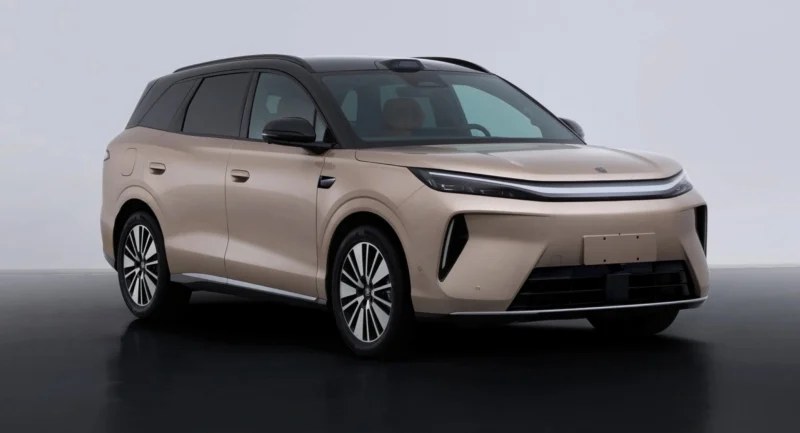 BYD Atto 8 (Sealion 8) powertrain specifications have emerged in China following the official publication of a new entry-level electric SUV variant by the Ministry of Industry and Information Technology. The newly registered model is known colloquially among domestic consumers as the Tang L to differentiate it from larger vehicle platforms. Chassis parameters outline a physical footprint measuring 5045 mm in length, 1980 mm in width, and up to 1760 mm in height, built upon a 2950 mm wheelbase. The unibody architecture incorporates symmetric 1700 mm track dimensions, an approach angle of 18 degrees, and a departure angle of 21 degrees. These factory dimensions match the spatial expectations established during local road testing of the next-generation platform prototype. Powertrain and performance The newly catalogued model features a permanent-magnet synchronous motor delivering a peak power output of 300 kW and a continuous-rated power of 150 kW. This single-motor hardware configuration expands the existing vehicle family by joining the high-performance BYD Tang L flagship, which launched in 2025 with up to 1086 hp and a dual-motor setup. The down-rated electrical assembly enables the passenger vehicle to reach a certified top speed of 250 km/h. This new variant alters the physical scale and electrical output when compared to the 2025 single-motor model year. The powertrain decreases from 500 kW (671 hp) down to 300 kW (402 hp), marking a reduction of 269 hp. While the architecture retains an identical 2950 mm wheelbase, the body shell extends by 5 mm to 5045 mm and narrows by 16 mm to 1980 mm. Braking performance is managed through an integrated IPB hydraulic brake framework supplied directly by FinDreams Power. The vehicle also carries a standard automotive event data recorder to comply with updated local transport safety mandates. Energy management is driven entirely by lithium iron phosphate cells sourced from internal manufacturing subsidiaries. Weights and options Regulatory disclosures outline two distinct curb weight classes based on cabin seating selections and driver-assist hardware suites. The heavy configuration ranges from 2390 kg to 2480 kg, offering optional five- or seven-seat interior arrangements. This variation relies on battery cells manufactured in Wuwei, with final pack integration finalised by a FinDreams assembly plant in Zhengzhou. The lighter five-seat trim registers a curb weight of 2195 kg and omits roof-mounted laser radar sensors from its body shell. Battery cell logistics for this edition are handled by a manufacturing facility in Hefei, while final pack integration occurs in Shanwei. Visual customisation alternatives across the product line include high-gloss black door panels, varying roof shades, and multiple aerodynamic wheel rims. Market and strategy The introduction of this entry-level model follows prior international rollouts for the vehicle family. The manufacturer previously commercialisedthe hybrid version in South America with retail pricing starting at 74,200 USD. This lower-specification model provides a higher-volume alternative to capture a broader consumer base as premium variants adjust to local retail conditions. Domestic market registrations highlight a clear need for refreshed configurations within the product line. Monthly deliveries of the upscale Tang L variant fell from 4249 units in July 2025 and 3338 units in December 2025 to 616 units in May 2026, according to China EV DataTracker. June 2026 registration data showed a modest shift to 629 units, securing a minor 0.3% brand share, underscoring the commercial timing of this new single-motor introduction. Rear perspective showcasing the taillight configuration and lower bumper design of the vehicle.
 -
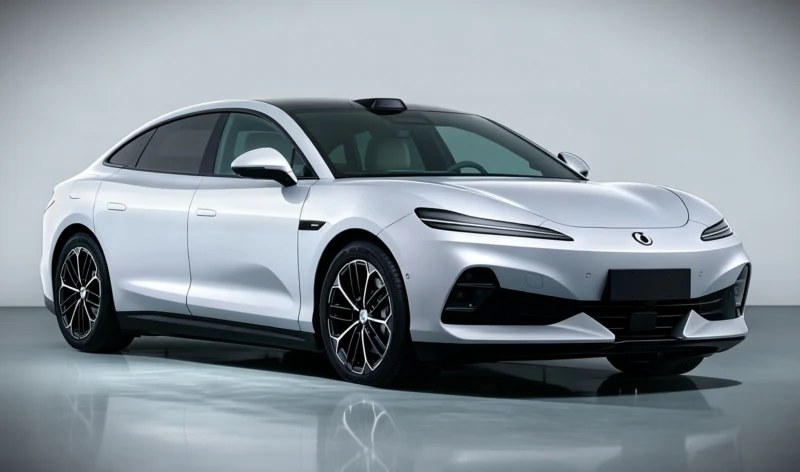 The Denza Z9S pure-electric sedan has been officially unveiled by the Ministry of Industry and Information Technology (MIIT) in its latest vehicle catalogue. Government regulatory filings revealed the upcoming luxury passenger car model ahead of its formal retail release, specifying two independent performance configurations sharing a large 3025 mm wheelbase. This sudden regulatory exposure provides a transparent view of the platform hardware driving the brand’s expansion. The new sedan architecture follows closely on the heels of high-profile premium product introductions from the premium joint venture, establishing a clear dual-layout strategy for the brand. This product expansion directly builds upon the fast retail trajectory of the Denza Z9 GT, which surpassed 10000 deliveries within 2.5 months of entering the consumer market. By adding a traditional notchback silhouette to the family, the automaker targets mainstream luxury demographics seeking understated premium proportions. Powertrain and hardware The baseline luxury trim utilises a permanent-magnet synchronous drive motor from Zhengzhou BYD, offering a rated capability of 160 kW and a peak output of 320 kW. This version has a curb weight of 2250 kg and utilises 19-inch wheel configurations with 245/50R19 front and 275/45R19 rear tyres. The underlying energy storage matrix utilises lithium-iron phosphate batteries, with cells manufactured by Hefei BYD and packs assembled by Shanwei FinDreams. The high-performance premium trim significantly increases output metrics by adopting an upgraded Zhengzhou BYD motor, generating a rated capability of 185 kW and a peak output of 370 kW (496 hp). This configuration weighs 2545 kg and employs 20-inch wheels paired with specialised HL275/40R20 tyres to handle the increased power draw parameters. Its lithium-iron phosphate battery hardware relies on cells produced by Wuwei FinDreams, with final assembly completed by Shenzhen BYD. Dimensions and equipment Certified physical parameters establish a broad stance for both sedan variants, with each vehicle measuring 5090 mm in length and 1980 mm in width. The lower-output model is slightly taller, with a body height of 1510 mm, whereas the higher-performance variant sits closer to the asphalt at 1490 mm. Both premium versions are limited to a top speed of 250 km/h and feature standard seating for 5 people. A fixed panoramic glass roof comes standard across the entire regulatory lineup alongside a mandatory automotive event data recorder (EDR) safety setup. Enthusiasts can customise the exterior appearance with optional factory equipment, including a motorised active rear spoiler, unique side-rearview mirror housings, and hidden door handle options. The high-performance variant features additional standalone options, including custom sport wheel rims and a variety of colored brake calliper finishes. Market delivery trends The arrival of the new sedan mirrors the premium automaker’s expanding domestic retail performance curve as it broadens its high-end vehicle portfolio. The premium brand recorded 18,631 sales in June 2026, marking a 19.3% month-over-month increase and a solid 31.1% gain compared with June 2025. These steady volume gains mark a clear departure from early-season registration drops, when winter volumes slipped to 5351 units, according to China EV DataTracker. This new luxury vehicle line slots into a product strategy aimed at solidifying premium market share, following the global path of the Denza Z, which debuted at Goodwood with a pre-sale starting from 184,800 USD. Utilising cost-effective lithium-iron phosphate battery packs across the Z9S lineup enables the automaker to set a highly competitive price bracket. This tactical architecture placement helps secure high-volume retail acquisitions while preserving the top-tier performance prestige of its global 1582 hp flagships. The upcoming executive sedan uses lithium-iron phosphate battery packs from specialised BYD subsidiaries.
 -
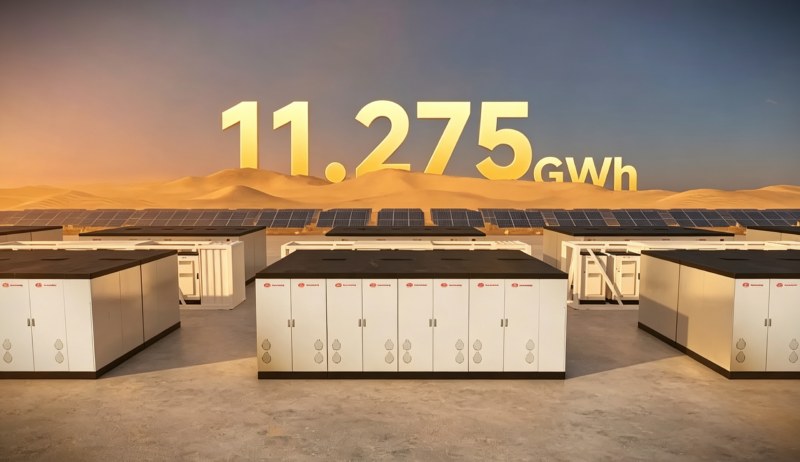 BYD’s electric vehicle battery architecture is scaling up from passenger cars directly into the electrical grid. The automotive manufacturer finalised an agreement with the UAE energy firm Masdar to deliver 11.275 GWh of specialised storage hardware, Sina reports. This contract supplies an equivalent battery volume required to manufacture more than 186,000 passenger electric vehicles. The equipment will deploy at the Round The Clock project in Abu Dhabi to support a 5.2 GW solar array. This site combines solar generation with utility-scale battery cells to maintain a constant 24-hour clean baseload. The deployment relies entirely on specialised battery containment setups engineered to handle high electrical throughput. Global scale comparisons To establish context within the global energy storage sector, this 11.275 GWh allocation ranks among the largest single-station procurements ever finalised. It highlights a clear trend where Chinese battery producers are securing utility contracts globally. The Abu Dhabi installation requires 19 GWh of total storage capacity to regulate its 5.2 GW solar array. BYD secured the remaining 11.275 GWh allocation after Sungrow captured a 7.5 GWh contract for the initial phase. Combined, these two Chinese suppliers locked out global competitors from the entire 19 GWh clean energy initiative. This consolidated procurement highlights an increasing reliance on Chinese hardware to stabilise utility grids in the Middle East. Blade battery hardware The storage installation introduces the proprietary BYD Haohan system configuration. This design abandons standard small-scale consumer formats and deploys a dedicated 2710Ah version of the cell technology used in passenger vehicles. Individual cell capacity increases by over 300% compared to legacy setups, altering the internal wiring and physical footprint of the storage facility. By increasing the physical volume of each individual cell, the total count of mechanical connections drops significantly. This structural optimisation enables engineering teams to reduce the complexity of the battery management system design by 70% to 80%. The system packs 10 MWh of storage capacity inside an equivalent 20-foot container shell, minimising the physical footprint of the station floor. Market strategic rivalry This utility execution runs parallel to recent technological roadmaps targeting static infrastructure, including the ongoing development of alternative chemistries where BYD is building a stationary energy storage fortress to reduce manufacturing baselines to 0.3 yuan (0.04 USD) per watt-hour. By leveraging shared raw-material procurement channels with its automotive divisions, the manufacturer reduces production costs across all assembly complexes. This cross-sector alignment ensures that capital-intensive industrial setups benefit directly from the efficiencies of passenger EV battery manufacturing. This large-scale grid deployment directly challenges international energy storage networks established by automotive rivals. The contract targets the same utility segment where CATL unveiled its Tener storage system to secure high-volume macro projects globally. The localised execution proves that automotive battery manufacturers are successfully utilising cell production scale to capture market share across international infrastructure pipelines, altering the competitive dynamics of the utility landscape.
 -
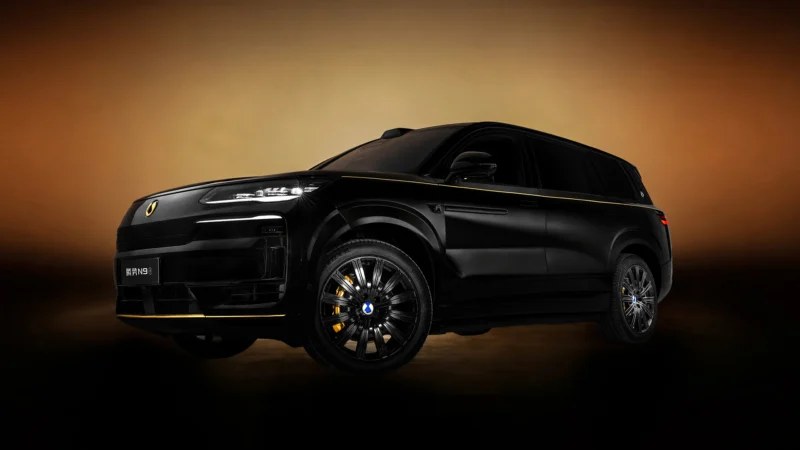 BYD’s Denza N9 plug-in hybrid crossover with flash-charging technology introduced the new color scheme called “Dark Gold.” It is currently available for free as a limited-time offer for the top-trim level of this SUV. Its biggest highlight is a front badge made of genuine gold. The new Denza N9 with the Dark Gold exterior color shade is finished in black with some golden accents, including horizontal stripes that go through the front fenders, doors, and rear fenders. Another golden accent is in the front bumper. Similar to the recently launched Denza D9 Dark Gold minivan, the N9 adopts a front badge covered with 24k gold. The Denza N9 Dark Gold Another fine feature of the Dark Gold color scheme is yellow brake calipers. It adopts 22-inch wheels. One more golden-colored badge could be seen on the car’s D-pillar from the passenger’s side. For some reason, the emblem on the D-pillar from the driver’s side is regular. Otherwise, the N9 stays in line with the regular model. It has a closed front end with large headlights, a LiDAR sensor on the roof, hidden door handles, a flat roofline, and a sporty rear spoiler. The Dark Gold exterior color scheme is available for the top-trim Flagship trim level of the Denza N9 for free as a limited-time offer. According to the automaker, the price of this option reaches 30,000 yuan (4,420 USD). The N9 Flagship costs 469,800 yuan (69,160 USD). This exterior color option is unavailable for the entry-level model. The second trim level could be equipped with this color scheme for 10,000 yuan (1,470 USD). The Denza N9 Dark Gold The new Denza N9 entered the domestic market on May 18, offering dimensions of 5258/2030/1830 mm with a wheelbase of 3,125 mm. Its interior adopts three rows of seats. There are a 17.3-inch central control screen, a 13.2-inch passenger entertainment display, and a 13.2-inch instrument cluster, complemented by a massive 50-inch HUD on the dashboard. The new N9 adopts the DiPilot 5.0 system. The Denza N9’s powertrain is a plug-in hybrid with a 2-liter ICE for 152 kW (204 hp) and three electric motors. An e-motor in the front produces 200 kW (268 hp), and two more electric motors sit in the rear axle, each producing 240 kW (322 hp). The combined output of the N9’s electric motors reaches 680 kW (912 hp). This car speeds up to 100 km/h in 3.7 seconds. One of the core features of the Denza N9 is a 75.3 kWh LFP Blade 2.0 battery. It provides up to 420 km of CLTC range in electric mode. Moreover, this battery boasts flash charging, allowing it to charge this pack from 10% to 978% in nine minutes. Other features of the car include rear-wheel steering, active suspension, and a mixed range of 1,520 km. Accroding to China EV DataTracker, the Denza N9 delivered 1,565 units in May 2026, down 66.1% Year-Over-Year.
 -
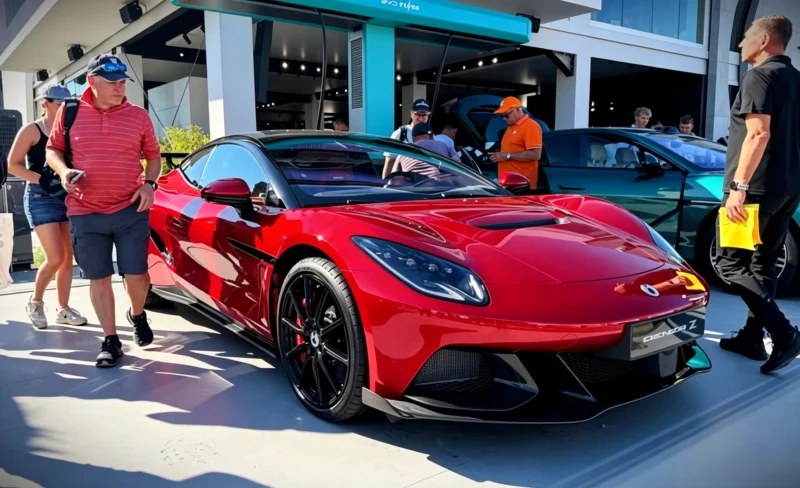 BYD showcased its global product expansion at the Goodwood Festival of Speed by hosting the public debut of the Denza Z high-performance electric sports car. The high-profile passenger EV group partner confirmed the model will be showcased in Coupe, Spider, and Racing variants, with the entry-level Coupe trim beginning its international pre-sale rollout at 142,900 pounds (184,800 USD), according to IThome. The tri-motor flagship vehicle utilises the specialised e³ (Yi Sanfang) intelligent control platform, pairing a single front motor with dual independent rear drive units. The technical architecture completely replaces mechanical steering link hardware with an integrated steer-by-wire FinDreams chassis system developed by the Fudi chassis division. This setup enables extreme cornering force distribution while supporting simulated mechanical shifting configurations natively inside the driver cockpit. Powertrain and battery The integrated propulsion system generates a combined peak output of 1180 kW, translating to 1582 horsepower through three independent electric motors. The Denza Z Track Edition spotted testing variant completes the 0 to 100 km/h sprint in 1.96 seconds and achieves a certified top speed of 350 km/h. The standard Coupe variant has a curb weight of 2230 kg, while the reinforced Track Edition weighs 2250 kg. Energy storage relies on a second-generation flat-pack lithium-iron-phosphate Blade battery pack manufactured by FinDreams. While domestic regulatory catalogue disclosures show a gross capacity layout scaling up to 102 kWh, initial export specifications list a usable capacity baseline of 76 kWh. This hardware configuration delivers a WLTP-rated driving range of approximately 600 km, supported by an 800V high-voltage electrical architecture capable of multi-megawatt rapid charging. Chassis and dynamics The vehicle utilises a specialised rigid carbon fibre composite cell cage structure coupled with standard carbon-ceramic brake discs to control thermal fade during high-speed deceleration. Official technical specifications show the standard Coupe variant features dimensions of 4780 mm in length, 1990 mm in width, and 1350 mm in height, built upon a 2780 mm wheelbase. The track-focused Racing trim modifies these body dimensions by extending total length to 4870 mm through specialised aerodynamic bodywork. Ride control is managed via the DiSus-M magnetorheological suspension system, which dynamically modulates the shock absorber fluid density within milliseconds. The track edition discards the adaptive air bellows found on the Coupe and Spider trims and utilises mechanical racing coil springs instead. The digital chassis management layer includes an integrated over-boost mode that increases peak system torque by 30% for a continuous 20-second window. Sales and strategy The global sports car launch occurs as the overarching brand experiences a domestic market turnaround following localised retail updates. Brand registration data indicates that deliveries expanded to 15,620 units during May 2026, representing a 46.8% month-on-month volume acceleration, according to China Ev DataTracker. This operational recovery advanced the brand’s total domestic passenger vehicle market share baseline to 1.0%. Denza Z challenges performance elite using second-generation Blade battery hardware.
 -
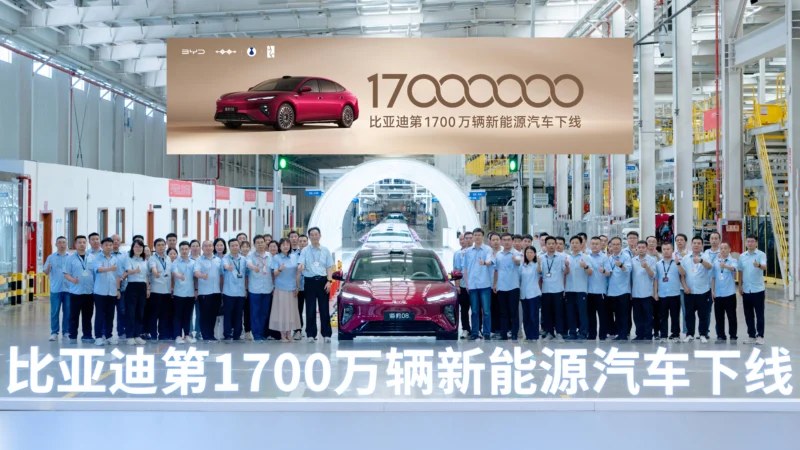 On July 8, 2026, BYD officially announced that its 17 millionth new energy vehicle (NEV) had rolled off the production line. The milestone vehicle is the BYD Seal 08, the company’s new flagship sedan, which officially launched on July 2. According to Yiche, the Seal 08 has already secured over 100,000 firm orders. This achievement marks a rapid acceleration in production capacity. BYD became the world’s first automaker to reach the 10 million NEV milestone on November 18, 2024, followed by the 15 millionth vehicle on December 18, 2025. The company reached the 17 million mark just over six months after hitting 15 million, and less than three months after reaching 16 million units. BYD Seal 08 The Seal 08 adopts the “Ocean Aesthetics 2.0” design language, featuring a closed front fascia, slender headlights, and a sculpted hood for a dynamic look. The vehicle is equipped with a roof-mounted LiDAR and features the “God’s Eye B” intelligent driving assistance system. Measuring 5150 x 1999 x 1505 mm with a wheelbase of 3030 mm, the sedan features a sleek fastback profile, semi-concealed door handles, and large multi-spoke wheels. The rear is highlighted by a full-width taillight design. Inside, the flagship cabin features a minimalist centre console with a large floating screen and a digital instrument cluster. The front row offers two “zero-gravity” seats. The rear cabin features electric leg rests, an independent control screen, a folding table, a built-in refrigerator, and seats equipped with heating, ventilation, and massage functions. Performance and technology The Seal 08 is available in both pure electric (BEV) and plug-in hybrid (PHEV) versions, both featuring flash-charging technology. BEV version: Built on an 800V high-voltage platform and powered by the second-generation Blade Battery, it offers a CLTC range of 905 km and can regain 400 km of range in 5 minutes of charging. PHEV version: Equipped with a 1.5T plug-in hybrid system, it features a combined motor power of 400 kW (536 hp) and a 45.36 kWh battery pack. It boasts a CLTC pure electric range of 400 km and a combined range of 1660 km. The vehicle also integrates rear-wheel steering and the DiSus-A intelligent body control system.
 -
 BYD convoys consisting of Denza and Fang Cheng Bao vehicles have entered deep flood zones in the Guangxi region to deliver emergency civilian relief supplies, according to 163. The volunteer operations materialised spontaneously through local owner networks following historic regional rainfall from Typhoon Mesaak. These real-world deployments bypassed standard consumer operational recommendations during the localised hydrological crisis. Engineering blueprints for these new energy vehicles emphasise high-voltage battery insulation and robust factory wading clearances. The non-bearing chassis architecture of the Fang Cheng Bao brand provides a certified wading depth of 800 mm, along with specialised underbody structural sealing. These physical parameters allow the vehicles to maintain traction across waterlogged provincial routes that routinely disable conventional internal combustion engines. Executive safety directives BYD Senior Vice President He Zhiqi published a directive on social media clarifying that new energy vehicles are not amphibious boats. The executive noted that while the proprietary Blade Battery components achieve certified IP67 and IP68 ingress protection standards, driving through deep water remains an operational risk. The factory specification guarantees submerge protection up to 1 meter for 24 hours without triggering thermal runaway or electrical leakage. Despite these explicit corporate cautions, the civilian BYD convoys travelled through deep waterlogged municipal sectors to reach isolated villages. Enthusiasts utilised the continuous power delivery of localised battery packs to maintain momentum through moving silt and debris. This grassroots mobilisation highlights a distinct separation between conservative factory operating guidelines and real-world consumer hardware application during sudden environmental challenges. Flagship field evaluation The citizen rescue operations featured premium vehicle models from BYD. Onlookers documented the newly unveiled luxury plug-in hybrid flagship navigating heavy mud pools alongside the recently launched hardcore off-road sports utility vehicle. These high-end configurations utilise multi-motor intelligent four-wheel-drive platforms to safely navigate low-traction environments. Deploying these premium utility vehicles for disaster response provides an unexpected field validation of their structural body durability. The vehicle architecture’s broad physical scale enables it to transport substantial volumes of life support provisions through degraded transport networks. This operational exposure functions as a transparent public assessment of the manufacturing group’s premium hardware platforms before commercial sales gather pace. Corporate capital relief Automakers have simultaneously allocated significant financial capital to support regional reconstruction efforts. The BYD Charity Foundation announced a direct donation of 10,000,000 yuan (1,469,900 USD) to fund frontline emergency teams and public infrastructure repair. Competitors also mobilised financial resources, with consumer technology giant Xiaomi allocating 10,000,000 yuan (1,469,900 USD) in cash, while Chery Auto Group committed a combined total of 10,000,000 yuan (1,469,900 USD) split between financial aid and physical supplies. These monetary interventions coincide with a broader expansion of premium vehicle sales within the domestic market. Denza’s official commercial operations crossed a milestone in June, delivering over 20,000 vehicles, reversing a multi-month period of flat volume. This commercial scaling demonstrates how the manufacturer’s expanding user ecosystem translates into decentralised civic action when regional public infrastructure networks face disruption. Volunteer BYD convoys featuring Denza and Fang Cheng Bao vehicles deployed into deep southern China floodwaters.
 -
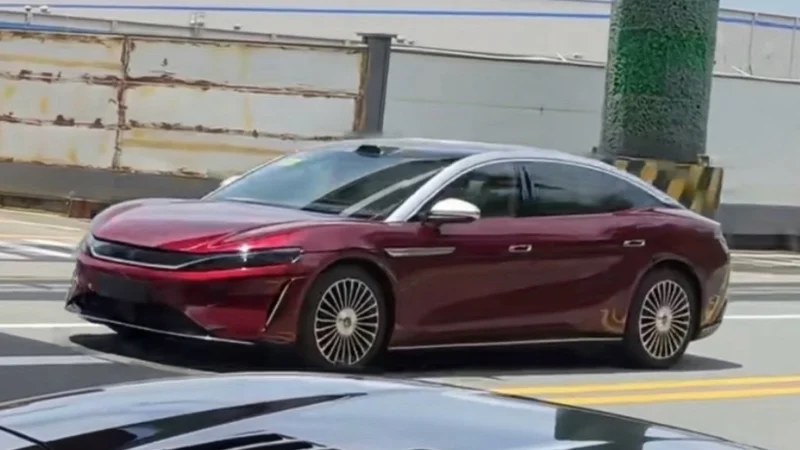 The BYD Da Han flagship sedan was seen in China without camouflage in glossy red color. It will enter the Chinese market shortly with BEV and PHEV powertrain variants. The all-electric Da Han boasts up to 1,008 km of range and flash charging technology. Another variant of this car’s name is Great Han. The BYD Da Han utilizes the same platform as the Da Tang (Great Tang) SUV that previously got over 100,000 pre-sale orders in less than two weeks after it had become available for reservations. The new sedan adopts the second-gen Blade battery, capable of charging from 10% to 97% in nine minutes. It also has rear-wheel steering and active suspension. The BYD Da Han On July 9, SugarDesign shared new spy shots of the BYD Da Han cruising on Chinese streets ahead of launch. The spotted car is finished in red with white front pillars and a roof. This sedan has some chrome trim around the body, as well as large multi-spoke rims with weighted center caps that always stay up. The distinguishing Han (汉) badge could be seen on those center caps. Other highlights of the Da Han’s exterior include semi-hidden door handles, a single taillight unit, thin headlamps joined by a chrome-plated element, and an active air intake. A LiDAR sensor sits on the roof, indicating the Da Han adopts the DiPilot 5.0 assisted driving system that is capable of the Navigate On Autopilot (NOA) function on urban roads and highways. The BYD Da Han sedan. Credit: MIIT The BYD Da Han boasts a sleek body shape with a slanted bonnet and a streamlined roofline. Its dimensions are 5256/1999/1510 mm. The wheelbase reaches 3,130 mm. For clarity, the Da Han is 66 mm longer than the standard Mercedes-Benz S-Class. Previously, this sedanapplied for a sales license in China. The entry-level Great Han EV has a single electric motor in the rear axle producing 370 kW (496 hp). There is also an AWD variant with a combined peak power of 570 kW (764 hp). There is no information about the battery options of the Da Han. However, it was reported that the RWD variant of this car will offer 1,008 km. The AWD version’s range reaches 880 km. The PHEV version of the Da Han adopts a 1.5-liter turbocharged petrol-powered BYD472ZQB engine with a peak power of 115 kW (154 hp). It works in pairs with a 200-kW (268 hp) e-motor. Thanks to a 54.489 kWh LFP battery, the Da Han PHEV can run up to 470 km in electric mode. The BYD Da Han targets the 300,000 yuan (44,100 USD) segment. The existing BYD Han lineup continues to sell in China. According to China EV DataTracker, the domestic sales of the standard BYD Han reached 3,390 units in May. The more powerful Han L delivered 689 units in the same period.
