May 8May 8 DashCast — BYD Cluster Launcher & MirrorAndroid application for BYD vehicles with DiLink 3.0 (Android 10) to push any installed app onto the instrument cluster display, control it via a real-time touch mirror, and diagnose BYD APIs.Links:Documentation: https://kiroha.github.io/byd-dashcast/Github: https://github.com/Kiroha/byd-dashcastApk's:VersionLinkv1.3.25-betaDetailsv1.3.24-betaDetailsv1.3.23-betaDetailsv1.3.22-betaDetailsv1.3.21-betaDetailsv1.3.20-betaDetailsv1.3.19-betaDetailsv1.3.18-betaDetailsv1.3.17-betaDetailsv1.3.16-betaDetailsv1.3.15-betaDetailsv1.3.14-betaDetailsv1.3.13-betaDetailsv1.3.12-betaDetailsv1.3.11-betaDetailsv1.3.10-betaDetailsv1.3.9-betaDetailsv1.3.8-betaDetailsv1.3.7-betaDetailsv1.3.6-betaDetailsv1.3.5-betaDetailsv1.3.4Detailsv1.3.3Detailsv1.3.3-betaDetailsv1.3.2Detailsv1.3.1Detailsv1.3.0Detailsv1.2.82-betaDetailsv1.2.81-betaDetailsv1.2.80-betaDetailsv1.2.79-betaDetailsv1.2.78-betaDetailsv1.2.77-betaDetailsv1.2.76-betaDetailsv1.2.75-betaDetailsv1.2.74-betaDetailsv1.2.73-betaDetailsv1.2.72-betaDetailsv1.2.71-betaDetailsv1.2.70-betaDetailsv1.2.69-betaDetailsv1.2.68-betaDetailsv1.2.67-betaDetailsv1.2.66-betaDetailsv1.2.65-betaDetailsv1.2.64-betaDetailsv1.2.63-betaDetailsv1.2.62-betaDetailsv1.2.61-betaDetailsv1.2.60-betaDetailsv1.2.58-beta-phase-A-step1Detailsv1.2.57-betaDetailsv1.2.56-betaDetailsv1.2.55-betaDetailsv1.2.54-betaDetailsv1.2.51-betaDetailsv1.2.49-betaDetailsv1.2.48-betaDetailsv1.2.47-betaDetailsv1.2.46-betaDetailsv1.2.45-betaDetailsv1.2.44-betaDetailsv1.2.43-betaDetailsv1.2.42-betaDetailsv1.2.40-betaDetailsv1.2.39-betaDetailsv1.2.38-betaDetailsv1.2.37-betaDetailsv1.2.36-betaDetailsv1.2.35-betaDetailsv1.2.34-betaDetailsv1.2.33-betaDetailsv1.2.32-betaDetailsv1.2.31-betaDetailsv1.2.28Detailsv1.2.27Detailsv1.2.26Detailsv1.2.25Detailsv1.2.24Detailsv1.2.23Detailsv1.2.22Detailsv1.2.21Detailsv1.2.20Detailsv1.2.19Detailsv1.2.18Detailsv1.2.17Detailsv1.2.16Detailsv1.2.15Detailsv1.2.14Detailsv1.2.13Detailsv1.2.12Detailsv1.2.11Detailsv1.2.10Detailsv1.2.9Detailsv1.2.8Detailsv1.2.7Detailsv1.2.6Detailsv1.2.5Detailsv1.2.4Detailsv1.2.3Detailsv1.2.2Detailsv1.2.1Detailsv1.2.0-build186Detailsv1.2.0-build185Detailsv1.2.0-build184Detailsv1.2.0-build183Detailsv1.2.0-build182Detailsv1.1.9-build180Detailsv1.1.9-build179Detailsv1.1.9-build178Detailsv1.1.9-build177Detailsv1.1.9-build176Detailsv1.1.9-build175Detailsv1.1.9-build174Detailsv1.1.9-build173Detailsv1.1.9-build172Detailsv1.1.9-build171Detailsv1.1.9-build170Detailsv1.1.9-build169Detailsv1.1.8Detailsv1.1.7Detailsv1.1.6Detailsv1.1.5Detailsv1.1.4Detailsv1.1.3Detailsv1.1.2Detailsv1.1.1Detailsv1.1.0-beta1Detailsv1.0.1Detailsv1.0.0Detailsv0.9.94Detailsv0.9.0Detailsv0.8.7Detailsv0.8.6Detailsv0.8.5Detailsv0.8.2Detailsv0.8.1Detailsv0.8.0Detailsv0.6.8-betaDetails0.5.1Detailsv0.5.0-betaDetailsv0.2.1Detailsv0.2.0-betaDetails
May 29May 29 Author DashCast v1.3.8-betaDL5 — Proactive accessibility service enable Fix The auto-keyboard feature (v1.3.5-beta) required the user to tap ⌨ manually at least once before the automatic trigger would work. Root cause: ClusterImeWatcherService was only enabled via ADB from inside KeyboardBridgeActivity (i.e. after a manual ⌨ tap). Field log byd_report_20260529_175757.log confirmed: service not active at session start → first auto-trigger only fired after manual ⌨ tap in fullscreen mirror. Change ClusterService.onCreate() now calls KeyboardBridgeActivity.ensureClusterImeEnabled() immediately when DL5 is detected (fire-and-forget ADB shell, ~300ms, idempotent). The service is active before the user ever touches the mirror. New KeyboardBridgeActivity.ensureClusterImeEnabled(Context) static method: same ADB settings put secure logic as tryAdbEnableA11y(), no UI side-effects.LinksAPK downloadGitHub release page
May 29May 29 Author DashCast v1.3.9-betaPre-release — fixes black screen at app restart Symptom (DL3 field log byd_log_20260529_234318) After Android kills your cluster app in the background (e.g. memory pressure while DashCast itself is in background), reopening DashCast shows an empty/black mirror of the cluster display until ~8 s later, when state-poll catches up and clears the stale state. Root cause At startup, mCurrentDashboardPkg is restored from PREF_CLUSTER_PKG. The pending auto-send fires onSendToDashboard, which takes a shortcut: pkg == mCurrentDashboardPkg → already on cluster, show mirror only. The mirror starts on a display where no app is running → black screen. The 8 s state-poll grace period was tuned for fresh launches and is far too slow for this restore-after-kill case. Fix In the auto-send branch of onActivationOk, when the pending app matches the restored cluster pkg, run pidof first via ShellGateway. If the process is dead → clearClusterState() before delegating to onSendToDashboard so it takes the normal fresh-launch path. If pidof errors out (daemon not yet ready) → fall back to the original shortcut, so no regression on the happy path. Net effect Process alive (happy path) → instant mirror, identical behaviour Process killed in background → clean re-launch in ~1-2 s instead of 8 s of black screen Daemon down → fallback to old behaviour versionCode 353 → 354 · versionName 1.3.8-beta → 1.3.9-betaLinksAPK downloadGitHub release page
May 29May 29 Author DashCast v1.3.10-betaPre-release — DL5 only Symptom After DashCast is restarted by the system (e.g. killed by installPackageLI during a background APK install), launching a cluster app takes ~18s before it appears on the cluster display. Root cause The daemon process survives DashCast restarts (via setsid + OOM adj -900). On reconnect, the bootstrap script touches a trigger file to ask the daemon to re-emit its binder. The daemon watches this file via FileObserver — but on DL5 (Android 12, uid=2000, app_process64), inotify events are silently not delivered. The 10s self-heal heartbeat was the only fallback, but the CountDownLatch timed out at 15s first, forcing the slow am start shell fallback. Total: ~18s. Fix Daemon (ProxyDaemonMain): heartbeat loop reduced from 10s to 1s. Each tick polls File.lastModified() on the trigger file (one stat() syscall, ~1µs). On mtime change → emitBroadcast() immediately. Client (BetaProxyClient): REBROADCAST latch timeout reduced from 15s to 5s. Cold-spawn (JVM boot 5-8s on DiLink SoCs) still uses the full 15s. Expected result App launch latency after reconnect: ~2-3s instead of 18s. versionCode 354 → 355 · versionName 1.3.9-beta → 1.3.10-betaLinksAPK downloadGitHub release page
May 29May 29 Author DashCast v1.3.11-betaPre-release — fix FileObserver silently failing on DL5 Symptom On DL5 (Android 12, uid=2000, app_process64), the REBROADCAST trigger was timing out at 5s instead of being detected immediately. The daemon was alive but FileObserver never fired — causing DashCast to wait the full 5s latch timeout after every APK install-kill. Root cause On Android 12, inotify watches on a specific file inode are silently dropped when the shell creates the trigger file with O_TRUNC (which may allocate a new inode). The FileObserver(TRIGGER_FILE, …) was watching the old inode — events on the new file were invisible. Fix Switch to a directory-level watch on /data/local/tmp with a filename filter. A directory watch tracks IN_CREATE / IN_CLOSE_WRITE on any child by name, regardless of inode recycling. This is robust to all file-creation patterns (O_TRUNC, rename, echo redirect). Also simplify healTriggerFile(): directory watch survives trigger file deletion — no need to stop/restart the observer on each heal tick. This fix complements the v1.3.10-beta 1s-poll fallback: the poll stays as belt-and-suspenders, but FileObserver now works correctly as the primary path. Affected versions DL5 only (Android 12 / API 32). DL3 was not affected. versionCode 355 → 356 · versionName 1.3.10-beta → 1.3.11-betaLinksAPK downloadGitHub release page
May 29May 29 Author DashCast v1.3.12-betaVoice detection fixes (Hey Jarvis) Two critical bugs in the ONNX pipeline were keeping the score at 0.000 permanently: Fix 1 — Missing PCM normalization AudioRecord outputs int16 in [-32768, 32767]. The copy into the float buffer was not dividing by 32768, saturating the mel features. The model was never receiving a valid signal. Fix 2 — Wrong melspectrogram shape (main bug) The melspectrogram.onnx model outputs shape (1, 1, 247, 32) (batch, channel, time, mels). The code was using raw.length as the number of time frames, but raw.length = 1 (the batch dimension). Result: nFrames = 1 < 196 required → systematic early return → score = 0.000 constant, the hey_jarvis model was never called. Result: score ~0.43 validated in car, two detections confirmed. ⚠️ Pre-release — branch feature/voice-v1.4-beta | versionCode 361 LinksAPK downloadGitHub release page
May 29May 29 Author DashCast v1.3.13-beta🎙️ Voice Commands — Phase 3 What's new VoskTranscriber: offline transcription after wake word detection, model vosk-model-small-fr-0.22 (~40 MB, downloaded automatically on first launch) VoiceCommandRouter: regex pattern matching on transcript → action + TTS feedback (FR) Supported commands: cluster on/off, launch app on cluster, open Diag, open Logs UI: new 'Voice Commands' card in the Diag/Voice tab with toggle switch + live transcript display Architecture: full pipeline Hey Jarvis → Vosk → Router → TTS → execution Fix Fixed calls to activateClusterDisplay / getScreenSizeCmd → delegated to local methods activateCluster() / restoreBydDashboard() Dependencies com.alphacephei:vosk-android:0.3.47 i18n 3 new strings across 12 locales (fr, en, de, es, it, ru, uk, be, kk, uz, tr, ar) ⚠️ Pre-release — branch feature/voice-v1.4-beta LinksAPK downloadGitHub release page
May 29May 29 Author DashCast v1.3.14-betaFix — Vosk model download Root cause StorageService.unpack() (Vosk API) reads from the APK assets — it never downloads from the network. Since the model is not bundled in the APK, the error listener fired silently and the transcript pipeline never started. Fix Replaced with a manual download pipeline: Checks if externalFilesDir("vosk")/vosk-model-small-fr-0.22/am/ already exists (skip if present) If not: HttpURLConnection → streams zip from alphacephei.com → ZipInputStream unzip on-the-fly Runs on a dedicated background thread vosk-model-loader Then new Model(path) → listen window opens Expected logs on first launch after enabling Voice Commands I/VoskTranscriber: Downloading model from https://alphacephei.com/vosk/models/vosk-model-small-fr-0.22.zip I/VoskTranscriber: Download complete I/VoskTranscriber: Opening model at .../vosk/vosk-model-small-fr-0.22 I/VoskTranscriber: Vosk model ready ⚠️ Pre-release — branch feature/voice-v1.4-beta | versionCode 364 LinksAPK downloadGitHub release page
May 29May 29 Author DashCast v1.3.15-betaFixes — Voice Commands pipeline Bug 1 — Transcription loop every ~1.5s (words cut off) Root cause: VoskTranscriber was opening its own AudioRecord while VoiceService already held the microphone. The second AudioRecord failed to initialize immediately, mListening was reset to false, and the next wake-word detection (1500 ms cooldown) re-triggered the same failing attempt — creating a loop. Fix: Removed the second AudioRecord entirely. VoskTranscriber now installs itself as a SampleConsumer on VoiceService's existing AudioRecord via getSampleConsumer()/setSampleConsumer(). A CountDownLatch blocks until silence or the 5 s window closes. The single AudioRecord in VoiceService keeps running; the WakeWordEngine feed is paused for the duration. Bug 2 — TTS silent on BYD DiLink Root cause: On BYD DiLink, the default TTS audio stream is not routed to the speakers while VOICE_RECOGNITION audio capture is active. Fix: speak() now passes STREAM_MUSIC in a Bundle to TextToSpeech.speak(). If TTS is unavailable, a Toast is shown as visual fallback. ⚠️ Pre-release — branch feature/voice-v1.4-beta | versionCode 365 LinksAPK downloadGitHub release page
May 29May 29 Author DashCast v1.3.16-betaFix double speak, TTS dedup guard, first-launch Toast. See commit 24f9fda.LinksAPK downloadGitHub release page
May 30May 30 Author DashCast v1.3.17-betaFix — clavier remonte les boutons (DiLink 5) Symptôme Sur DiLink 5, quand un champ texte prend le focus (ex : barre de recherche Yandex Maps), le clavier virtuel redimensionnait la fenêtre MainActivity. Le NestedScrollView se compressait et les boutons Fullscreen mirror / Stop projection remontaient en haut de l'écran. Cause MainActivity n'avait pas de windowSoftInputMode → comportement Android par défaut : adjustResize. Fix windowSoftInputMode="adjustPan|stateHidden" sur MainActivity dans AndroidManifest.xml : le clavier glisse par-dessus la fenêtre sans la redimensionner. versionCode 366 → 367 · versionName 1.3.16-beta → 1.3.17-betaLinksAPK downloadGitHub release page
May 30May 30 Author DashCast v1.3.18-betaNew Feature — LLM-powered voice assistant (OpenAI) Replaces regex command routing with OpenAI GPT-4o-mini + TTS-1 for a natural, conversational in-car assistant. How it works Say "Hey Jarvis" — wake word detected locally (ONNX, offline) Your command is transcribed by Vosk (offline, on-device) The transcript is sent to GPT-4o-mini which understands free-form French and returns a structured command + reply The reply is synthesised by OpenAI TTS-1 (voice: nova) and played as audio Setup Open Diagnostics → Voice tab Paste your OpenAI API key in the new field at the bottom (sk-…) Enable voice commands — the status line confirms whether Jarvis AI or regex fallback is active Fallback behaviour If no API key is set, or if a network error occurs, the app silently falls back to the existing offline regex router. The app never crashes due to LLM failures. Supported commands (free-form French) Activate / deactivate the cluster display Open Diagnostics or Logs Launch an app on the cluster Security API key stored in EncryptedSharedPreferences (AES-256-GCM) — never logged, never committed All OpenAI calls over HTTPS Technical New LlmVoiceEngine.java: chat completion → JSON parse → TTS → MediaPlayer (AudioAttributes + prepareAsync) androidx.security:security-crypto:1.1.0-alpha06 added i18n: 2 new strings in all 12 locales versionCode 367 → 368 · versionName 1.3.17-beta → 1.3.18-betaLinksAPK downloadGitHub release page
May 30May 30 Author DashCast v1.3.19-betaFixes — Voice pipeline reliability Problem 1: Command word cut off ("diagnostic" → "stic") Root cause: after wake-word detection fires, VoskTranscriber creates a Recognizer object before installing the PCM consumer. This takes ~100-200 ms, during which the beginning of the spoken command is simply discarded. Fix: 500 ms pre-roll ring buffer added to VoiceService. The capture loop continuously fills a circular buffer. When Vosk starts listening, it first feeds the pre-roll audio (covering the Recognizer init gap) into the recognizer, then switches to live audio. Zero gap. Problem 2: TTS not always played / inconsistent Root cause: no AudioFocusRequest, so the system could route audio unexpectedly; also no guard against a new TTS starting while a previous one was still playing. Fix: AudioFocusRequest(GAIN_TRANSIENT_MAY_DUCK) acquired before prepareAsync(), abandoned in OnCompletionListener / OnErrorListener mActiveMp guard: previous MediaPlayer is stopped before starting a new one Tuning — silence detection (car environment) Silence threshold raised: 200 → 500 RMS (avoids false silence in car noise) Silence window reduced: 1200 → 800 ms (snappier end-of-command detection) versionCode 368 → 369 · versionName 1.3.18-beta → 1.3.19-betaLinksAPK downloadGitHub release page
May 30May 30 Author DashCast v1.3.20-betaJARVIS voice character TTS voice Switched from nova (warm/feminine) to onyx — the deepest, most authoritative voice in OpenAI's TTS-1 lineup. Closest available match to the JARVIS aesthetic. System prompt rewrite The LLM is now instructed to embody JARVIS: formal, laconic, dry British-butler tone. Replies are capped at 10 words and go straight to the point. Before: "D'accord ! Je vais activer le cluster maintenant." After: "Immédiatement, Monsieur." "Diagnostic ouvert, Monsieur." "Je n'ai pas saisi votre requête, Monsieur." versionCode 369 → 370 · versionName 1.3.19-beta → 1.3.20-betaLinksAPK downloadGitHub release page
May 31May 31 Author DashCast v1.3.21-betaInternal refactoring — no behavior change SharedPreferences single source of truth All SharedPreferences access is now routed through ClusterPrefs, a new static utility class. Previously, the prefs file name "byd_app_prefs" and ~13 key constants were duplicated across 4 files (MainActivity, SettingsActivity, BetaConfig, BootReceiver), creating a silent bug surface where a typo in any duplicate would silently read/write a different key. What changed: ClusterPrefs (new) — single definition of all prefs file name, all key strings, all typed read/write methods BetaConfig — removed duplicate PREFS_NAME literal SettingsActivity — 4 constants now delegate to ClusterPrefs, 4 raw call sites replaced BootReceiver — removed PREFS_NAME field, 2 raw call sites replaced MainActivity — 13 PREF_* constants removed, 30+ raw call sites replaced with ClusterPrefs.* methods Zero behavior change — same prefs file, same keys, same defaults throughout. versionCode 370 → 371 · versionName 1.3.20-beta → 1.3.21-betaLinksAPK downloadGitHub release page
May 31May 31 Author DashCast v1.3.22-betaFixes — Voice command reliability Fix 1: Spurious "not understood" on empty audio When nothing was heard (or only background noise), Vosk returned an empty transcript. This was silently routed to the LLM which replied "I didn't understand" and played the TTS. Fix: route() now returns immediately on empty/whitespace transcripts — no API call, no TTS. Fix 2: "diagnostic" correctly heard but LLM replies "not understood" Root cause: GPT-4o-mini occasionally wraps its JSON response in markdown code fences (json ... ) despite being instructed not to. This caused a JSONException, the pipeline silently fell back to the regex router, which didn't match anything, and the fallback TTS said "not understood". Fix: JSON response is stripped of any markdown code fences before parsing. Fix 3: ASR homophones ("mettez" instead of "météo") Vosk makes phonetic errors in car conditions. The system prompt now instructs the LLM to: Correct common ASR mistakes in automotive context ("mettez" → "météo", "diagnostique" → "diagnostic", etc.) Accept command synonyms ("allume" = activate, "étein" / "ferme" = deactivate, "diag" = diagnostic…) Use 5 few-shot examples to reinforce correct JSON output format Reply "Je ne gère pas cette fonction, Monsieur." for unsupported commands (not "I didn't understand") versionCode 371 → 372 · versionName 1.3.21-beta → 1.3.22-betaLinksAPK downloadGitHub release page
May 31May 31 Author DashCast v1.3.23-betaLarge Vosk model support with resumable download New feature: high-accuracy ASR model The Voice tab in DiagActivity now offers a choice between two Vosk French models: Model Size Accuracy Small (default) ~40 MB Good for short commands Large (vosk-model-fr-0.6-linto) ~1.3 GB Significantly better French ASR The large model is recommended when on Wi-Fi and when you experience recurring transcription errors (e.g. «mettez» for «météo»). Resumable download Download resumes automatically after a connection drop (HTTP Range: bytes=X-) No read timeout — safe for large files on a slow connection Disk space check before starting (requires 2× zip size free) Download written to .download.tmp then unzipped; temp file deleted on success Progress UI Progress bar in the Diag → Voice tab (0–100%) during download Indeterminate bar during unzip phase Storage available shown in real time Delete button to free up disk space Technical VoskTranscriber: two model configs, constructor reads ClusterPrefs.isVoskHighAccuracy() New broadcast extras: EXTRA_PROGRESS, EXTRA_PROGRESS_MB, EXTRA_PROGRESS_TOTAL (-1 = unzipping) Static helpers: isModelDownloaded(), getFreeSpaceMb(), deleteModel(), preDownload() Strings localised in all 12 supported locales versionCode 372 → 373 · versionName 1.3.22-beta → 1.3.23-betaLinksAPK downloadGitHub release page
May 31May 31 Author DashCast v1.3.24-betaWhat's new in 1.3.24-beta Architecture — Phase 2: AppRepository wiring App list loading is now fully delegated to AppRepository. The 100-line inline loader that lived inside MainActivity has been removed. Favorite toggle no longer re-queries PackageManager. Previously toggling a favorite triggered a full PM scan (~150 ms). It now patches the in-memory cache and re-sorts instantly. Auto-launch toggle now goes through AppRepository.setAutoLaunch() — consistent persistence, no manual loop over the adapter. Extracted deliverAppsToUI(): single method splits favorites (strip) vs. non-favorites (grid), feeds both views, and manages the one-shot welcome tip. Sort order preserved: Category (Navigation → Media → Other) → Favorites first → Launch count ↓ → Alphabetical. Architecture — Phase 1 (v1.3.21-beta, included as base) ClusterPrefs introduced as single source of truth for all SharedPreferences access — eliminates scattered duplicate constants across MainActivity, SettingsActivity, BootReceiver, and BetaConfig. Pre-release on feature/voice-v1.4-beta — not merged into main.LinksAPK downloadGitHub release page
May 31May 31 Author DashCast v1.3.25-betaWhat's new in 1.3.25-beta Voice — General-purpose AI assistant mode Jarvis now handles any question, not just car commands. New talk command replaces the dead-end unknown response: Car commands (cluster, diagnostics, logs, app launch) → executed + brief confirmation ≤ 10 words Everything else (Q&A, calculation, general culture, advice…) → free answer ≤ 2 sentences Behavioral changes: talk responses no longer dispatch to VoiceCommandRouter — no spurious broadcasts for pure conversation max_tokens raised from 120 → 200 to allow fuller answers to general questions Jarvis is honest about missing real-time data (weather, traffic): acknowledges the limitation rather than refusing ASR correction context tightened to driving scenarios Examples: "combien font 17 fois 23" → "391, Monsieur." "quelle est la capitale du Japon" → "Tokyo, Monsieur." "météo" → "Je n'ai pas accès aux données en temps réel, Monsieur. Consultez votre appli météo." "allume le cluster" → cluster activated Pre-release on feature/voice-v1.4-beta — not merged into main.LinksAPK downloadGitHub release page






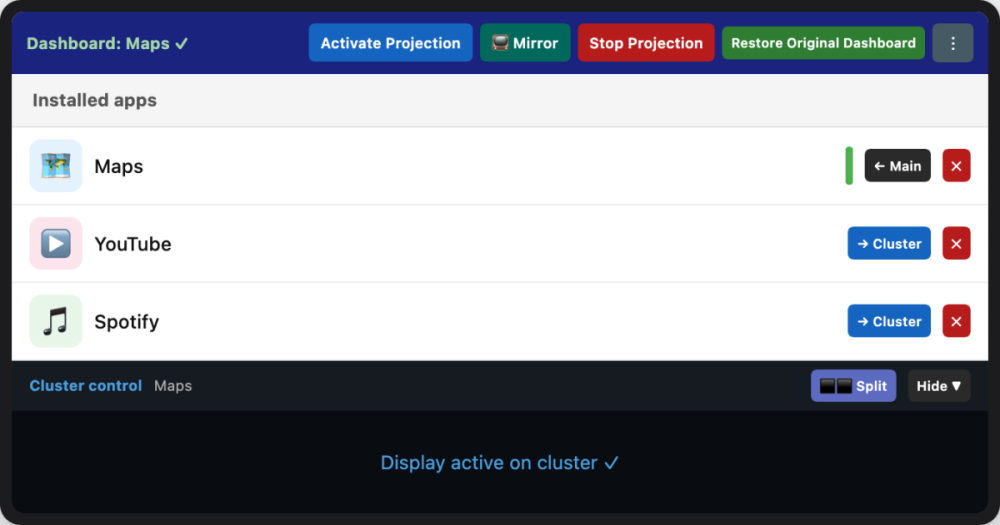
DashCast — BYD Cluster Launcher & Mirror
Android application for BYD vehicles with DiLink 3.0 (Android 10) to push any installed app onto the instrument cluster display, control it via a real-time touch mirror, and diagnose BYD APIs.
Links:
Documentation: https://kiroha.github.io/byd-dashcast/
Github: https://github.com/Kiroha/byd-dashcast
Apk's:
Version
Link
v1.3.25-beta
Details
v1.3.24-beta
Details
v1.3.23-beta
Details
v1.3.22-beta
Details
v1.3.21-beta
Details
v1.3.20-beta
Details
v1.3.19-beta
Details
v1.3.18-beta
Details
v1.3.17-beta
Details
v1.3.16-beta
Details
v1.3.15-beta
Details
v1.3.14-beta
Details
v1.3.13-beta
Details
v1.3.12-beta
Details
v1.3.11-beta
Details
v1.3.10-beta
Details
v1.3.9-beta
Details
v1.3.8-beta
Details
v1.3.7-beta
Details
v1.3.6-beta
Details
v1.3.5-beta
Details
v1.3.4
Details
v1.3.3
Details
v1.3.3-beta
Details
v1.3.2
Details
v1.3.1
Details
v1.3.0
Details
v1.2.82-beta
Details
v1.2.81-beta
Details
v1.2.80-beta
Details
v1.2.79-beta
Details
v1.2.78-beta
Details
v1.2.77-beta
Details
v1.2.76-beta
Details
v1.2.75-beta
Details
v1.2.74-beta
Details
v1.2.73-beta
Details
v1.2.72-beta
Details
v1.2.71-beta
Details
v1.2.70-beta
Details
v1.2.69-beta
Details
v1.2.68-beta
Details
v1.2.67-beta
Details
v1.2.66-beta
Details
v1.2.65-beta
Details
v1.2.64-beta
Details
v1.2.63-beta
Details
v1.2.62-beta
Details
v1.2.61-beta
Details
v1.2.60-beta
Details
v1.2.58-beta-phase-A-step1
Details
v1.2.57-beta
Details
v1.2.56-beta
Details
v1.2.55-beta
Details
v1.2.54-beta
Details
v1.2.51-beta
Details
v1.2.49-beta
Details
v1.2.48-beta
Details
v1.2.47-beta
Details
v1.2.46-beta
Details
v1.2.45-beta
Details
v1.2.44-beta
Details
v1.2.43-beta
Details
v1.2.42-beta
Details
v1.2.40-beta
Details
v1.2.39-beta
Details
v1.2.38-beta
Details
v1.2.37-beta
Details
v1.2.36-beta
Details
v1.2.35-beta
Details
v1.2.34-beta
Details
v1.2.33-beta
Details
v1.2.32-beta
Details
v1.2.31-beta
Details
v1.2.28
Details
v1.2.27
Details
v1.2.26
Details
v1.2.25
Details
v1.2.24
Details
v1.2.23
Details
v1.2.22
Details
v1.2.21
Details
v1.2.20
Details
v1.2.19
Details
v1.2.18
Details
v1.2.17
Details
v1.2.16
Details
v1.2.15
Details
v1.2.14
Details
v1.2.13
Details
v1.2.12
Details
v1.2.11
Details
v1.2.10
Details
v1.2.9
Details
v1.2.8
Details
v1.2.7
Details
v1.2.6
Details
v1.2.5
Details
v1.2.4
Details
v1.2.3
Details
v1.2.2
Details
v1.2.1
Details
v1.2.0-build186
Details
v1.2.0-build185
Details
v1.2.0-build184
Details
v1.2.0-build183
Details
v1.2.0-build182
Details
v1.1.9-build180
Details
v1.1.9-build179
Details
v1.1.9-build178
Details
v1.1.9-build177
Details
v1.1.9-build176
Details
v1.1.9-build175
Details
v1.1.9-build174
Details
v1.1.9-build173
Details
v1.1.9-build172
Details
v1.1.9-build171
Details
v1.1.9-build170
Details
v1.1.9-build169
Details
v1.1.8
Details
v1.1.7
Details
v1.1.6
Details
v1.1.5
Details
v1.1.4
Details
v1.1.3
Details
v1.1.2
Details
v1.1.1
Details
v1.1.0-beta1
Details
v1.0.1
Details
v1.0.0
Details
v0.9.94
Details
v0.9.0
Details
v0.8.7
Details
v0.8.6
Details
v0.8.5
Details
v0.8.2
Details
v0.8.1
Details
v0.8.0
Details
v0.6.8-beta
Details
0.5.1
Details
v0.5.0-beta
Details
v0.2.1
Details
v0.2.0-beta
Details